The Vendor Payment Report module is used to generate a list of all payments that have been made to suppliers/vendors within a specific time period. This report is crucial for tracking cash outflow and for payment reconciliation purposes.
1. Report Parameters (Filter)
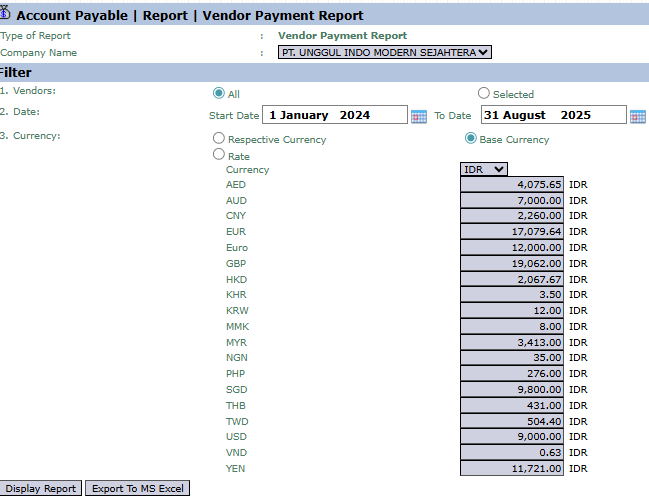
The main page of this module is a form containing several parameters to customize the report that will be generated.
Here is an explanation for each parameter:
Vendors:
Filter the report by All vendors or a Selected vendor.
Date:
Specify the Start Date and To Date payment range to be displayed (e.g., January 1, 2024, to August 31, 2025).
Currency:
Choose how currency values will be displayed, whether in Respective Currency (original currency) or Base Currency (base currency).
2. Steps to Generate the Report
Step 1: Set Report Parameters
Define the Vendors scope and the payment Date range.
Step 2: Generate the Report
After all parameters are set, click one of the two buttons in the bottom-left section of the page:
Display Report: To preview the payment report directly on your screen.
Export To MS Excel: To download the report data in an Excel file format.
3. Example of the Report View
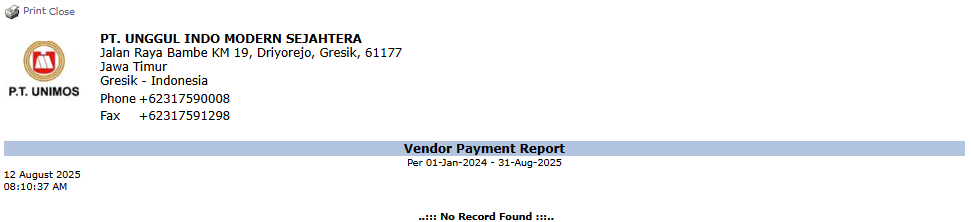
After you click, the system will generate a report like the following, which details every payment to vendors.
Report Explanation: This report will display a list of all payments made to vendors within the selected period.
Content: Although the example is empty, this report will contain details such as Vendor Name, Payment Date, Payment Number, Payment Amount, and the reference Invoice Number that was settled.
Tips & Important Notes
Use this report to summarize the total cash disbursement for payable payments in a single period.
This report is a recapitulation of the data created in the Vendor Payment module.
This is an important report for the Finance and Accounting (AP - Account Payable) teams for the process of reconciling cash disbursements with the bank statement.




No comments to display
No comments to display