Accounts Receivable > Report > Customer Payment History
Module Objective
The Customer Payment History report module is used to generate a report containing the history or archive of all payments that have been received from customers. This report is very useful for reviewing payment history, performing confirmations, and for reconciliation purposes.
1. Report Parameters (Filter)
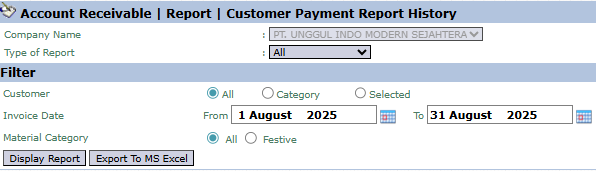
The main page of this module is a form containing various parameters to customize the report that will be generated.
Here is an explanation for each parameter:
Customer:
Filter data by customer by selecting: All, Category, or Selected (Specific Customer).
Invoice Date:
Specify the From and To invoice date range. This report will display payments received for invoices that were issued within this period.
Material Category:
An additional filter to screen by material category: All or Festive.
2. Steps to Generate the Report
Step 1: Set Report Parameters
Select all the parameters you need, especially defining the Customer and the Invoice Date range to get specific data.
Step 2: Generate the Report
After all parameters are set, click one of the two buttons in the bottom-left section of the page:
Display Report: To preview the payment history report directly on your screen.
Export To MS Excel: To download the report data in an Excel file format.
Tips & Important Notes
Use this report to track and verify a customer's payment history in detail.
This report can be a strong supporting document when performing a bank reconciliation or a customer's accounts receivable reconciliation.
This is an important report for the Accounts Receivable (AR) team to manage administration and payment history.




No comments to display
No comments to display