The Letter of Credit (LC) module is a special tool used to manage import purchase transactions that use the Letter of Credit payment method. This module is used to record LC details, link them to the relevant Purchase Order, and track the stages and completeness of the documents required during the import process.
1. Main View (LC List)
The main page of this module displays a list of all Letter of Credit documents that have been created.
View Explanation & Filters
This page is for viewing and managing all LC transactions.
Filters: You can search for a specific LC by LC Number or a date range (Date From / Date To).
LC List: The table below will display all LC documents that match the filters, with columns such as LC Number, LC Date, Due Date, Purchase Order No, LC Status, and Approval Status.
Button Functions
New: The primary button to create a new LC document.
2. Steps to Create an LC Document
Step 1: Create a New LC Document
From the Main View, click the New button to open the LC creation form.
Step 2: Fill in LC Header Information
On the form that appears, fill in the general information and LC details:
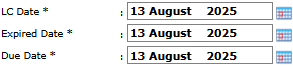
LC Information: Enter the LC Number (if not automatic), LC Date, Expired Date, and Due Date.
References & Related Parties:
Purchase Order Number: Select the Purchase Order whose transaction is guaranteed by this LC.
Seller Bank (Exporter): Select the Seller's Bank.
Buyer Bank (Importer): Select the Buyer's Bank.
Carrier: Select the goods shipping company.
Step 3: Monitor the Purchasing Steps
Use the detail table at the bottom as a checklist to monitor the completeness of documents and the stages of the import process.
Update the Document Status column for each stage (for example, from Incomplete to Complete) as you complete or receive the relevant documents, such as Customs Documents or the Importer Identification Number.
Step 4: Save and Confirm
After all data is filled in, use the buttons in the bottom-left section:
Save: To save the LC document as a draft.
Confirm: To finalize the document and send it into the approval workflow.
Cancel: To cancel the entry.
Tips & Important Notes
This module is crucial for import transactions that require a payment guarantee through a bank.
Always update the Document Status at each stage to ensure the progress status of the LC process in the system is always accurate.
A Confirmed LC document will likely go to the LC Approval module to be validated by management.
This module is generally used by the Procurement (Import) and Exim teams.





No comments to display
No comments to display