The Penetration Report module is used to generate a matrix report that shows the distribution or "penetration" of product sales across various customers or points of sale. This report is very useful for analyzing which products have been sold at each customer and identifying further cross-selling opportunities.
1. Report Parameters (Filter)
The main page of this module is a form containing various parameters to customize the report that will be generated.
Here is an explanation for each parameter:
Customer:
Filter data by the customer scope: Customer (specific customer), Leader, or All.
Customer Category:
Further filter by customer category, either All or a specific Category.
Period:
Specify the From and To date range to define the period of sales transactions to be analyzed (e.g., August 1, 2025, to August 7, 2025).
2. Steps to Generate the Report
Step 1: Set Report Parameters
Select all the parameters you need, especially defining the Period range and the Customer scope.
Step 2: Generate the Report
After all parameters are set, click one of the two buttons in the bottom-left section of the page:
Display Report: To preview the product penetration report directly on your screen.
Export To MS Excel: To download the report data in an Excel file format.
3. Example of the Report View
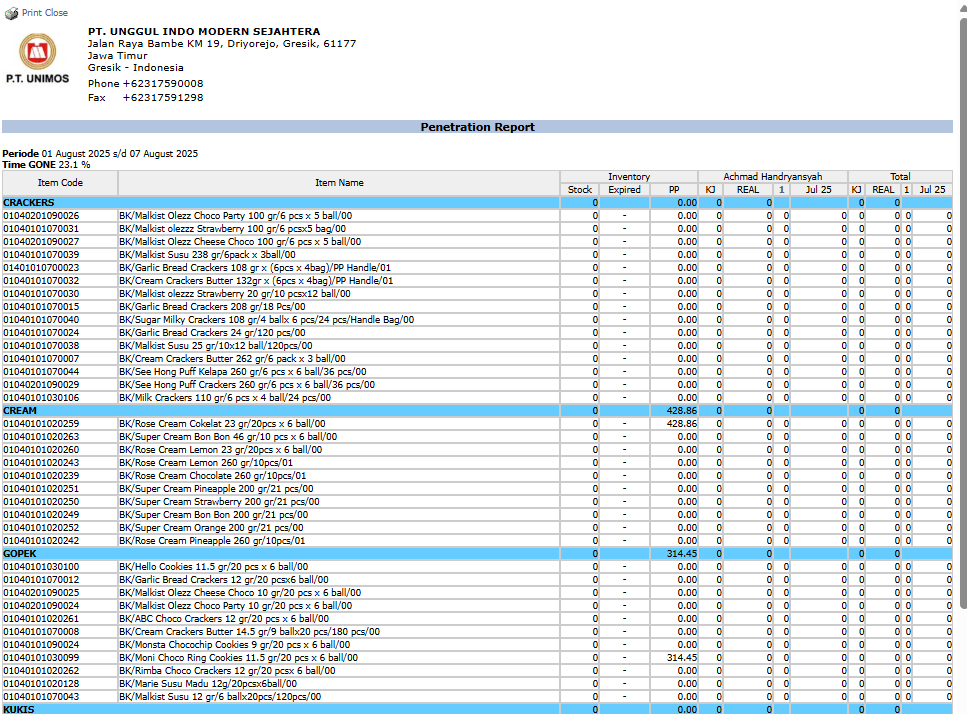
After you click, the system will generate a detailed report in a matrix format as follows:
Report Explanation: This report presents data in a matrix format to facilitate the analysis of product spread.
Rows: Display a list of Item Code and Item Name, grouped by product category (CRACKERS, CREAM, KUKIS, etc.).
Columns: Display a list of customers or sales outlets. Each column represents one point of sale or customer.
Data Cells: Each cell at the intersection of a row and column will show the quantity of the product sold to that customer/outlet.
Tips & Important Notes
Use this report to identify which customers have not yet purchased certain products, thereby opening up opportunities to cross-sell.
This report is very useful for the Sales and Marketing teams to design more effective and targeted distribution and promotion strategies.
Analyzing this report can help in understanding which products are popular in specific customer segments.





No comments to display
No comments to display