The Sales Report by Distributor (Perdistributor Sales Report) module is used to generate a detailed transactional report of all sales activities. This report can be filtered and grouped by various levels of the sales hierarchy such as Distributor, Salesman, or Leader, making it very useful for monitoring sales performance specifically.
1. Report Parameters (Filter)
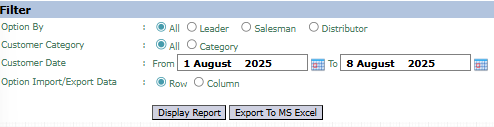
The main page of this module is a form containing various parameters to customize the report that will be generated.
Here is an explanation for each parameter:
Option By:
The primary filter to select the report's scope, whether All, per Leader, Salesman, or a specific Distributor.
Customer Category:
A further filter based on customer category.
Customer Date:
Specify the From and To date range to define the period of sales transactions to be displayed (e.g., August 1, 2025, to August 8, 2025).
Option Import/Export Data:
Select Row or Column to set the layout of the generated report.
2. Steps to Generate the Report
Step 1: Set Report Parameters
Select all the parameters you need, especially defining the scope in Option By and the Customer Date range.
Step 2: Generate the Report
After all parameters are set, click one of the two buttons in the bottom-left section of the page:
Display Report: To preview the sales report directly on your screen.
Export To MS Excel: To download the report data in an Excel file format.
3. Example of the Report View
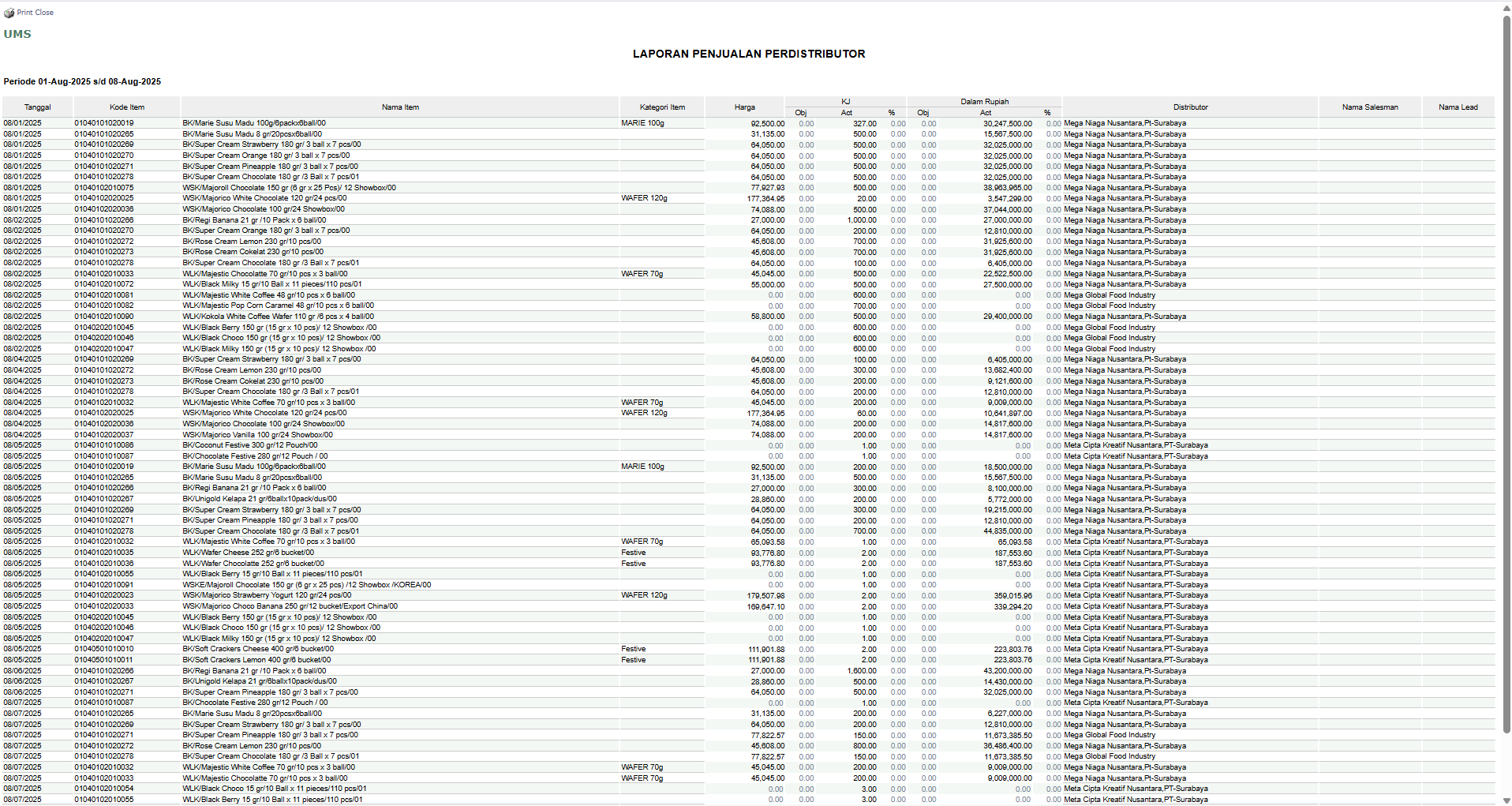
After you click, the system will generate a detailed report like the following, which details every sales transaction chronologically.
Report Explanation: This report displays a list of all sales transactions in detail and in order by Date (Tanggal).
Key Columns:
Item Code and Item Name: Details of the product sold.
Quantity and Rupiah Value: The quantity and value of each transaction.
Distributor, Salesman Name, Lead Name: Displays the parties involved in each sales transaction.
Tips & Important Notes
Use this report to monitor the daily or weekly sales performance of each distributor or salesman.
The Option By filter is very flexible for performance analysis. For example, select Salesman to see all transactions successfully recorded by one salesperson.
This is a detailed register report, highly suitable for further processing using the Export to MS Excel feature.





No comments to display
No comments to display