Purchasing > Purchase Order > Purchase Order Report
Module Objective
The Purchase Order Report module is used to generate a highly comprehensive and flexibly filterable report for all Purchase Order (PO) activities. This report is a primary operational tool for tracking order status, monitoring purchasing activity, and analyzing procurement data in detail.
1. Report Parameters (Filter)
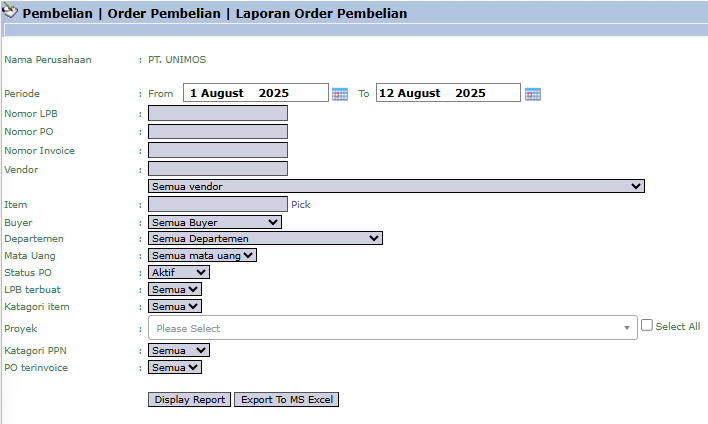
The main page of this module is a form containing various parameters to customize the report that will be generated.
Here is an explanation for each key parameter:
Period:
Specify the creation date range of the POs for which data will be pulled.
Document & Related Party Filters:
You can search by a specific PO Number, Vendor, Item, or Buyer.
Status Filter:
PO Status: Filter by the PO's status (e.g., open, closed, approved).
Goods Receipt created: Filter to see POs for which the goods have or have not yet been received (based on the Goods Receipt Note/LPB).
PO invoiced: Filter to see POs that have or have not yet been billed by the vendor.
2. Steps to Generate the Report
Step 1: Set Report Parameters
Select all the parameters you need from the comprehensive list to focus the report on the data you wish to analyze.
Step 2: Generate the Report
After all parameters are set, click one of the two buttons at the bottom:
Display Report: To preview the purchase order report directly on your screen.
Export To MS Excel: To download the report data in an Excel file format.
3. Example of the Report View
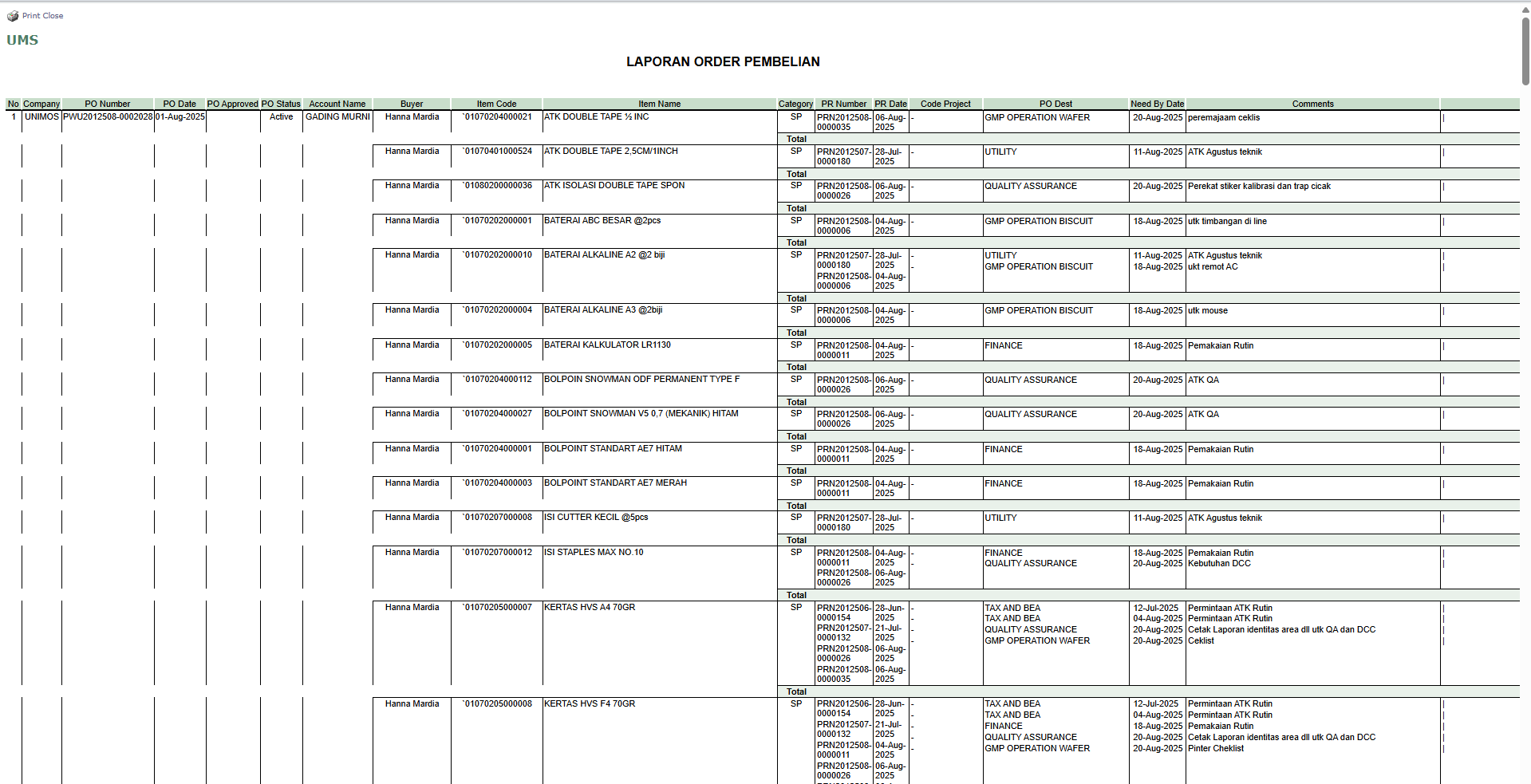
After you click, the system will generate a detailed report like the following, which details every item in every PO.
Report Explanation: This report displays a detailed list of each item line on every Purchase Order, grouped by the PO number.
Key Columns:
PO Number and PO Date: Basic information of each order.
Account Name: The name of the supplier (vendor).
Buyer: The name of the responsible purchasing staff.
Item Code, Item Name: Details of the goods or services ordered.
Qty, Price: The quantity and price of each item.
PR Number: The original Purchase Requisition reference number.
Tips & Important Notes
Use this report to monitor the lifecycle of each purchase order. You can track it from when the PO was created to whether the goods have been received and invoiced.
For the Procurement team, this is a crucial daily operational report for monitoring the status of all outstanding orders.
Filtering by the Goods Receipt created and PO invoiced statuses is very useful for performing reconciliation with the Warehouse and Accounting teams.



No comments to display
No comments to display