The Activity History Report module is used to generate a report containing the history or a list of all activities (such as meetings, phone calls, tasks) that have been recorded in the Activity Module. This report is very useful for managers to monitor the productivity of the sales team and for the sales team to review the interactions they have had with customers.
1. Report Parameters
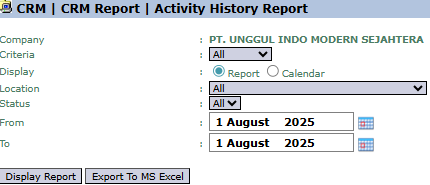
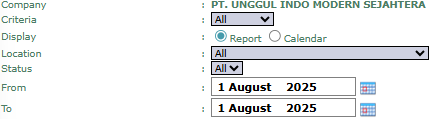
The main page of this module is a form containing various parameters to customize the report that will be generated.
Here is an explanation for each parameter:
Criteria:
Use this dropdown to filter the report by specific criteria, most likely such as per Salesperson, per Customer, or per Activity Type.
Display:
Choose the display format you want for the report.
Report: Displays the data in a standard list or table format.
Calendar: Displays the data in a visual calendar format.
Location / Status:
Filter the report by the location or the status of the activities (for example, to only display activities that are "Done" or completed).
From / To:
Specify the From and To date range to define the report's period (e.g., August 1, 2025).
2. Steps to Generate the Report
Step 1: Set Report Parameters
Select all the parameters you need, especially defining the date range and other criteria to get the specific data you want.
Step 2: Generate the Report
After all parameters are set, click one of the two buttons in the bottom-left section of the page:
Display Report: To preview the activity report directly on your screen.
Export To MS Excel: To download the report data in an Excel file format.
Tips & Important Notes
This report is an excellent tool for Sales Managers to monitor the quantity and type of activities performed by each member of their team.
Use the Calendar format to get a visualization of the schedule of past activities within a period.
The accuracy of this report is highly dependent on the Sales team's discipline in routinely recording all of their activities in the Activity Module.



No comments to display
No comments to display