The Purchase Invoice module is the center of the payables recording process. Its purpose is to record the official bill or invoice received from a supplier (vendor). This process is crucial because this is what formally creates the Accounts Payable in the accounting system.
1. Main View (Purchase Invoice List)
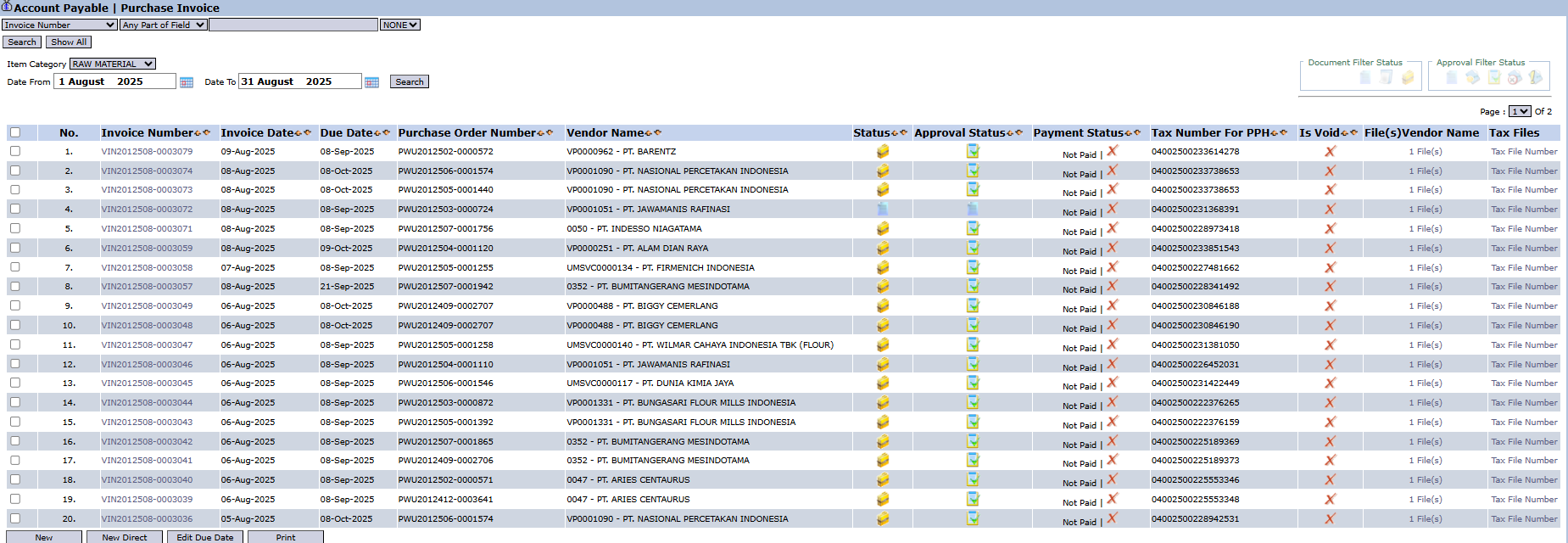
The main page of this module displays a list of all Purchase Invoices that have been recorded.
View Explanation & Filters
This page is for viewing and managing all purchase invoices.
Filters: You can search for a specific invoice by Invoice Number, Item Category, or a date range.
Invoice List: The table below displays all invoices that match the filters, with important columns such as Invoice Number, Due Date, Vendor Name, and Payment Status.
Button Functions
New: To create a Regular Purchase Invoice (based on a PO and goods receipt).
New Direct: To create a Direct Purchase Invoice (without a PO, e.g., for utility bills).
Edit Due Date: To change the due date of a selected invoice.
Print: To print the details of an invoice.
2. Steps to Create a Purchase Invoice
A. Creating a Regular Purchase Invoice (Based on PO)
This is the most common method and aligns with best practices (three-way matching).
From the Main View, click the New button.
On the Add Purchase Invoice form, select the Vendor. The system will display a list of relevant Purchase Order Numbers in the list box.
Select one or more Purchase Orders (and their related Goods Receipt/RR numbers) that correspond to the bill from the vendor, then click Get Detail.
The system will automatically populate the item detail table below according to the PO and goods receipt data.
Important: Enter the original invoice number from the vendor in the Invoice No. field. Double-check all details, especially the dates (Invoice Date, Due Date) and the total value.
Click Confirm to finalize the invoice.
B. Creating a Direct Purchase Invoice
This method is used for bills that are not related to inventory purchases via a PO.
From the Main View, click the New Direct button.
On the form that appears, you will be able to enter bills not related to inventory purchases (such as for electricity, rent, or consulting services) by selecting the vendor and directly choosing the expense account to be debited.
Workflow & Integrated Business Process
The three-way matching process between the Purchase Order, Goods Receipt, and Purchase Invoice is a best practice for internal control.
An invoice that has been Confirmed will automatically create a payable record in the Accounts Payable Module and will be ready to be scheduled for payment.
A confirmed invoice will likely go to the Purchase Invoice Inbox to be approved.
Tips & Important Notes
Always prioritize creating purchase invoices using the regular method (based on a PO) to maintain data integrity.
Entering the original invoice number from the vendor in the Invoice No field is crucial for the reconciliation process with the vendor.





No comments to display
No comments to display