Module Guide: Direct Selling Receipt (Direct Sales Invoices)
Module Location
Direct Selling > Direct Selling Receipt
Module Objective
The Direct Selling Receipt (Direct Sales Invoices) module is the billing stage in the direct selling workflow. Its purpose is to create an official invoice or receipt to be given to the customer. This document is created based on a Direct Selling Sales Order that has been shipped and becomes the basis for recording the receivable.
1. Main View (Receipt/Invoice List)
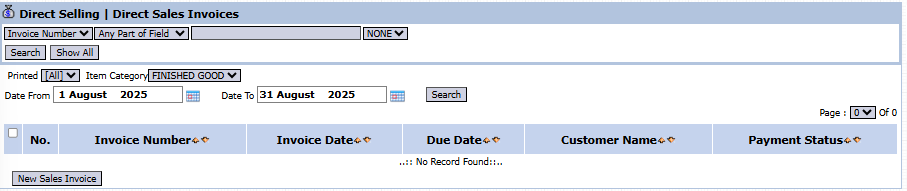
The main page of this module displays a list of all Direct Selling invoices or receipts that have been issued.
View Explanation & Filters
This page is for viewing and managing all direct sales invoices.
Filters: You can search for a specific invoice by Invoice Number, Item Category, or a date range (Date From / Date To).
Invoice List: The table below will display all invoices that match the filters, with columns such as Invoice Number, Invoice Date, Due Date, Customer Name, and Payment Status.
Button Functions
New Sales Invoice: The primary button to create a new Direct Selling invoice/receipt.
2. Steps to Create a Direct Selling Receipt
Step 1: Create a New Receipt
From the Main View, click the New Sales Invoice button to open the Add Direct Sales Invoice form.
Step 2: Select the Sales Order
This is the most crucial step.
On the Add form, first select the Customer from the dropdown.
After selecting the customer, the system will display a list of billable Sales Order Numbers in the list box.
Select one or more Sales Order Numbers to be combined into a single invoice.
Click the Get Detail button.
Step 3: Verify Receipt Details
The system will automatically pull all the item, quantity, and price details from the selected Sales Order(s) and populate them into the detail table at the bottom.
Double-check that important dates like the Invoice Date and Due Date are correct.
Step 4: Save the Receipt
After all data is verified, click the Save button to save the document. There will likely be a Confirm button afterwards to finalize the invoice and record it as a receivable.
Workflow & Integrated Business Process
This module is the billing stage after the goods have been shipped via the Direct Selling Delivery Order.
A receipt or invoice that has been finalized here will automatically create a receivable record in the Accounts Receivable Module.
Tips & Important Notes
To ensure the billing matches the order and shipment, always create the receipt/invoice based on a valid Sales Order Number.
This document is the basis for on-field collection by the direct sales team and for the settlement process in the next module






No comments to display
No comments to display