The Convert Deposit to Revenue module is a special accounting tool used to create an adjusting journal entry to recognize a "Deposit" or "Customer Down Payment" (which was initially recorded as a liability) as official company Revenue. This process is performed when the conditions for revenue recognition have been met (for example, the goods have been shipped or the service has been rendered).
1. Main View (Deposit List)
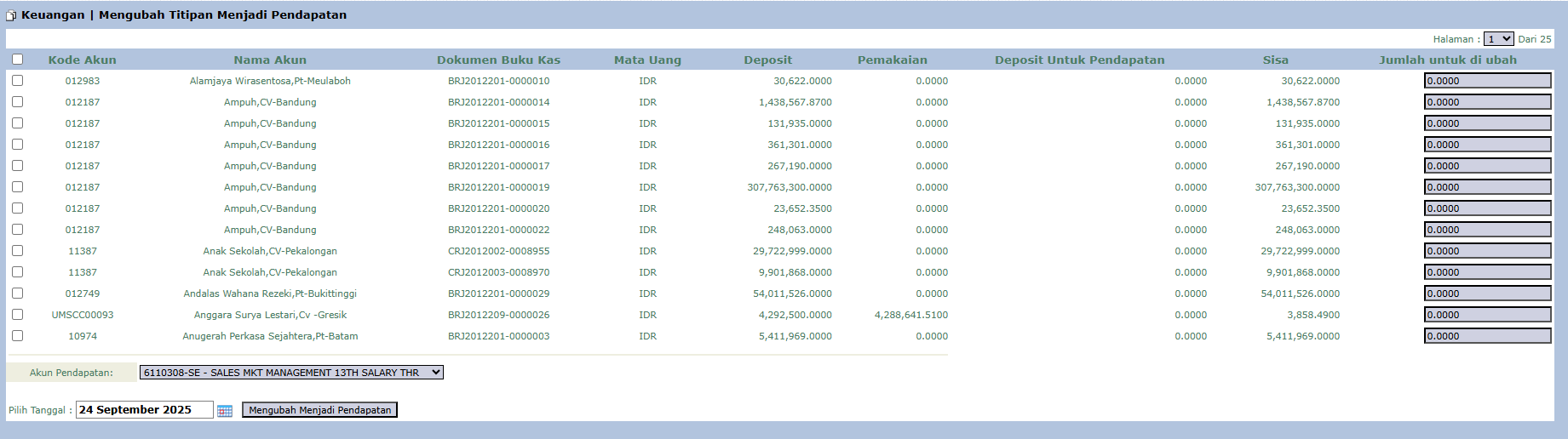
The main page of this module is an interactive list that displays all deposits from customers that still have a remaining balance.
View and Column Explanation
This page is for selecting and processing deposits that will be recognized as revenue.
Deposit List: The main table displays all available deposits, with important columns such as:
Account Name: The name of the customer who made the deposit.
Deposit: The initial deposit amount received.
Usage: The amount of the deposit that has been previously used.
Remaining: The remaining balance of the deposit that is still available.
Amount to be converted: The main input column where you enter the amount to be recognized as revenue.
2. Steps to Recognize Revenue
Step 1: Find and Select the Deposit
Find the row for the customer's deposit that will be recognized as revenue in the available list.
Step 2: Enter the Amount to be Recognized
On the corresponding row, in the Amount to be converted column, enter the value that will be recognized as revenue. You can enter a partial amount or the entire remaining balance.
Step 3: Select the Revenue Account
At the bottom of the page, in the Revenue Account field, select the appropriate revenue account from the General Ledger for this transaction.
Step 4: Set the Date & Process
Select the effective Date for this revenue recognition.
Click the [Convert To Revenue] button to process the transaction.
Workflow & Integrated Business Process
Accounting Impact: This action will automatically create a journal entry: Debit the Deposit/Customer Down Payment liability account and Credit the Revenue Account you selected.
Accounting Principle: This process is the core of the accrual accounting principle for revenue recognition. Only perform this when the conditions for revenue recognition (e.g., services have been rendered or goods have been shipped) have been met.
Tips & Important Notes
This is a primary work tool for the Accounting team.
This process will reduce the liability balance (down payment liability) and increase the revenue balance on the Profit & Loss Statement.

No comments to display
No comments to display