The List Of Cash Book Entry module serves as the central hub for recording, managing, and monitoring all of the company's cash and bank inflow transactions. This module is the primary register book for all cash inflows, whether from customer payments, interest income, or other sources, before they are finally posted to the General Ledger.
1. Main View (List Of Cash Book Entry)
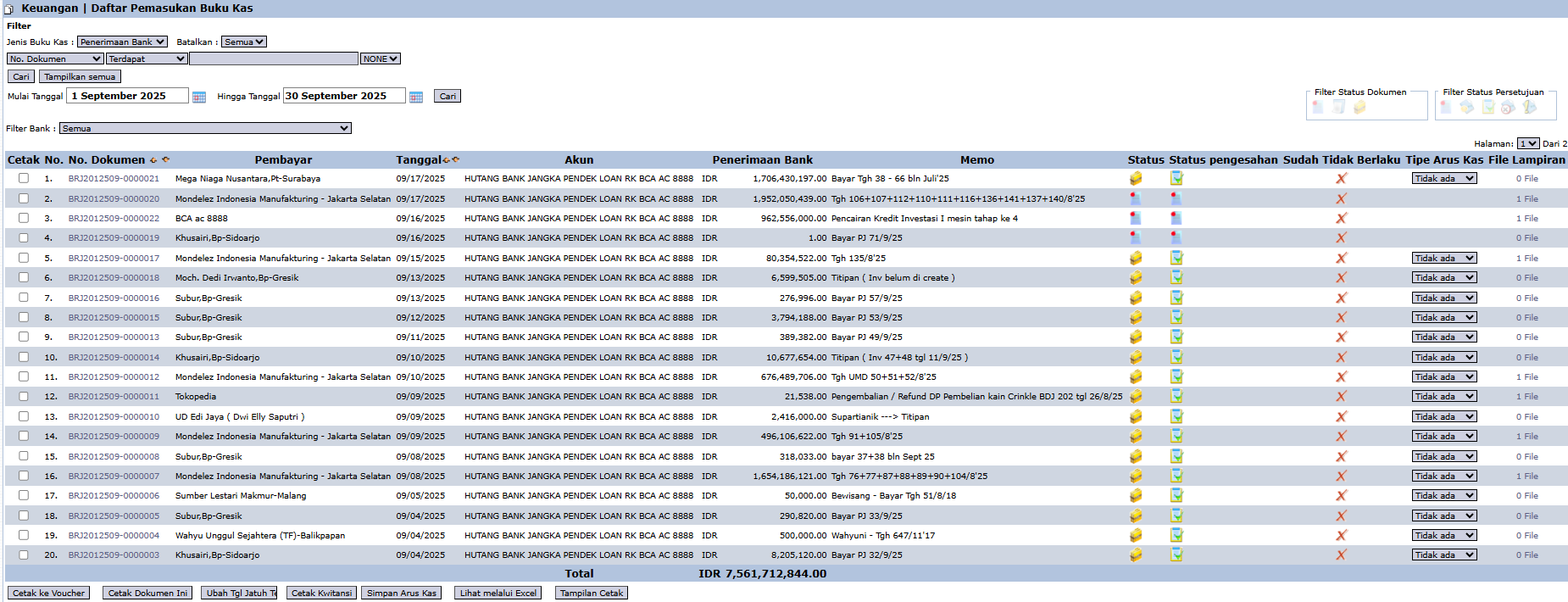
The main page of this module displays a list of all cash and bank inflow transactions that have been recorded in the system.
View Explanation & Filters
This page is for viewing and managing all inflow transactions.
Filters: You can filter transactions by Cash Book Type (e.g., Bank Receipt), Document No., a Date range, or a specific Bank Filter.
Transaction List: The table below displays all transactions that match the filters, with important columns such as Doc. No., Payer, Date, Account (Bank Account), Bank Receipt (Amount), Approval Status, and Is Posted.
Main Button Functions
The bottom section of this page provides various action buttons to manage the selected transactions:
Detail: To see the complete details of a transaction.
Post This Document: The crucial button for posting the transaction to the General Ledger. This action will change the status in the Is Posted column from X to ✓ and will officially record the transaction in accounting.
Print to Voucher: To print the transaction proof in a voucher format.
View via Excel: To export the displayed data into an Excel file format.
2. General Workflow
Transaction Recording: A cash/bank inflow transaction is created, either automatically from another module (e.g., Customer Receipt) or input manually.
Appears in List: The transaction will appear in the list in this module, typically with the 'Is Posted' status still marked as 'X'.
Verification & Posting: The user (Finance/Treasury staff) verifies the data. Once certain it is correct, the user selects the transaction and clicks Post This Document to officially book it.
Finalization: The transaction is now recorded in the General Ledger and affects the related account balances.
Tips & Important Notes
The Is Posted column is a very important indicator. An 'X' mark means the transaction is still temporary (unposted) and has not yet affected the account balances in the financial statements.
This module is a vital daily monitoring tool for the Treasury and Finance teams to monitor the company's cash inflow.
To ensure accurate financial reports, make sure all relevant transactions have been posted (Post This Document) at the end of the period (e.g., end of day or end of month).

No comments to display
No comments to display