Sales > Reports > Sales Order Reports > Uninvoiced SO
Module Objective
The Uninvoiced SO Report module is used to generate a list of all Sales Orders (SOs) that have been processed but have not yet been fully invoiced. This report is a crucial control tool to ensure no sales or shipments are missed for billing, thereby helping to maintain smooth cash flow.
1. Report Parameters (Filter)
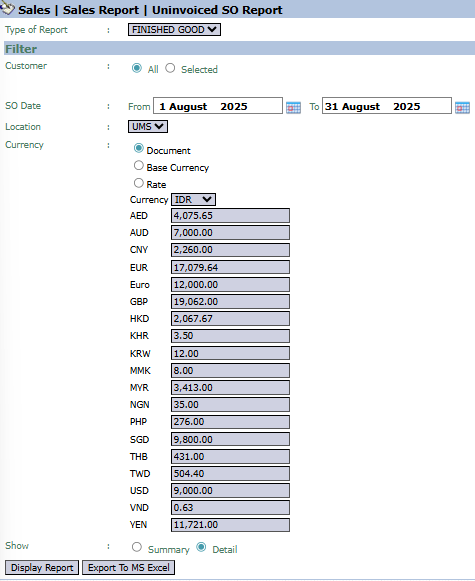
The main page of this module is a form containing various parameters to customize the report that will be generated.
Here is an explanation for each parameter:
Customer:
Filter the report by All customers or a Selected customer.
SO Date:
Specify the From and To SO creation date range to be displayed (e.g., August 1, 2025, to August 31, 2025).
Location:
Filter the report by location or warehouse.
Show:
Select the report's level of detail: Summary or Detail.
2. Steps to Generate the Report
Step 1: Set Report Parameters
Select all the parameters you need, especially defining the SO Date range to see the uninvoiced SOs within that period.
Step 2: Generate the Report
After all parameters are set, click one of the two buttons in the bottom-left section of the page:
Display Report: To preview the report directly on your screen.
Export To MS Excel: To download the report data in an Excel file format.
3. Example of the Report View
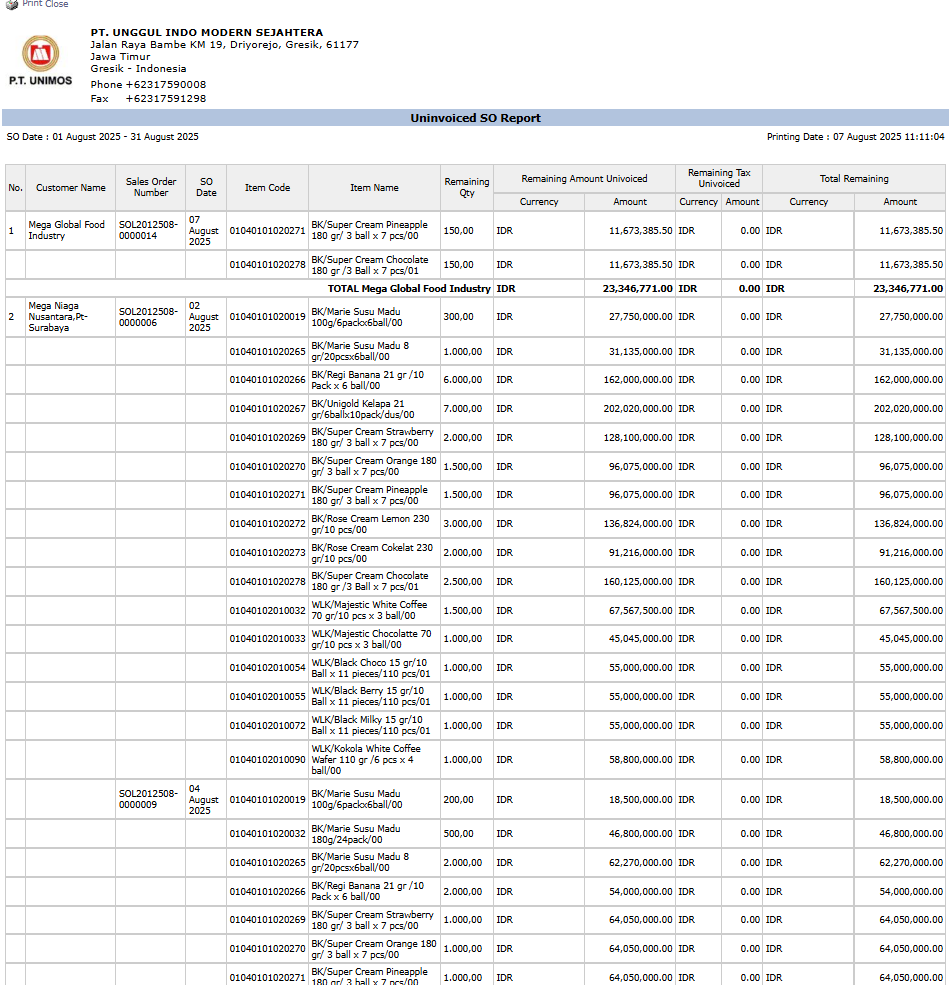
After you click, the system will generate a detailed report like the following, which details every SO that still has a remaining balance to be billed.
Report Explanation: This report displays a detailed list of each Sales Order that still has a quantity or value yet to be invoiced, grouped per customer.
Key Columns:
Sales Order Number: The reference SO number.
Item Name: Details of the product yet to be billed.
Remaining Qty: The remaining quantity that has not been invoiced.
Remaining Amount Uninvoiced: The remaining value that has not been invoiced.
Total Remaining: The total remaining bill per Sales Order.
Tips & Important Notes
Run this report routinely (e.g., daily or weekly) to ensure no sales are missed for billing.
This report serves as a "worklist" for the Sales Admin or Accounting (AR) team to create Sales Invoices.
The Remaining Amount Uninvoiced column is a key indicator of potential revenue that has not yet been recorded as a receivable.




No comments to display
No comments to display