The Void Cash Book module is an administrative tool that is used to void cash or bank transactions (both inflows and outflows) that have been incorrectly recorded. The "void" process is different from "delete"; "void" will keep a record of the transaction in the system but give it a "canceled" status and automatically create a reversing journal to neutralize its accounting impact.
1. Main View (Cash/Bank Transaction List)
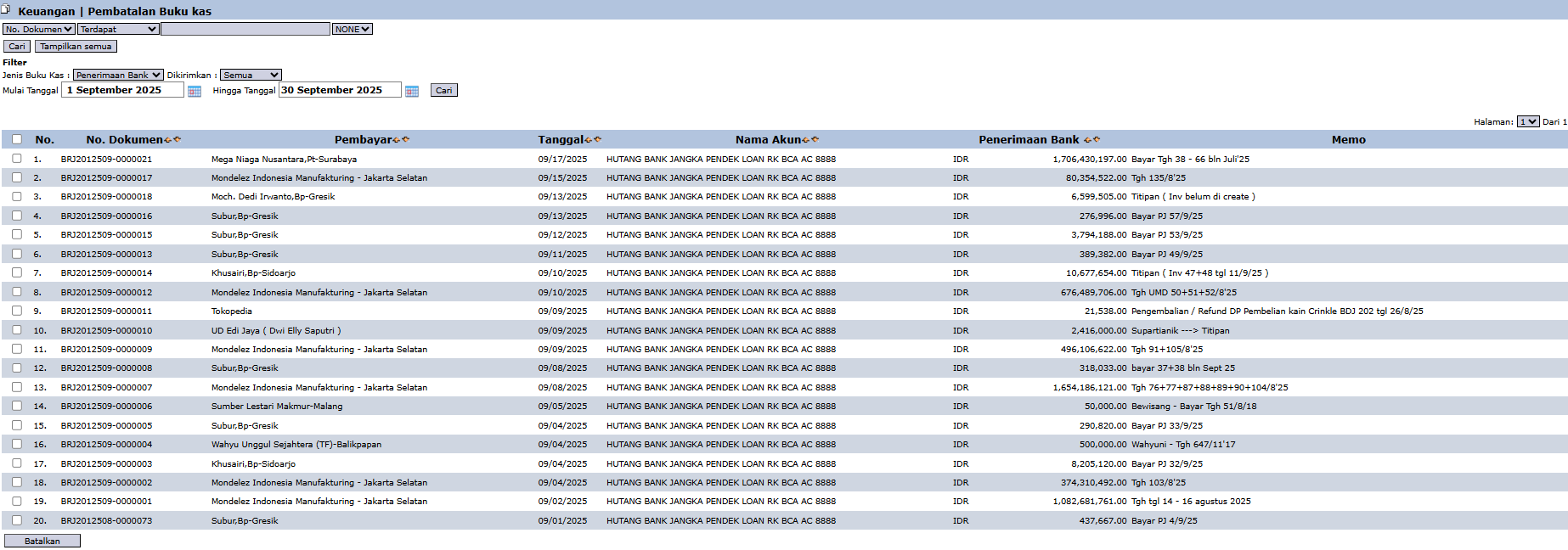
The main page of this module displays a list of active cash and bank transactions that can be voided.
View Explanation & Filters
This page is for finding and selecting the transaction to be voided.
Filters: You can search for a specific transaction by Doc. Number, Cash Book Type (e.g., Bank Receipt), or a Start Date and End Date range.
Transaction List: The table below will display all transactions that match the filters, with columns such as Doc. Number, Payer (for inflows) or Payee, Date, Account Name (bank account), and the amount.
Button Functions
Void: The main action button to run the voiding process on a selected transaction.
2. Steps to Void a Cash Book Transaction
Step 1: Find the Transaction
Use the available filters to find and locate the cash/bank transaction you wish to void.
Step 2: Select the Transaction
Select one or more transactions to be voided by checking the box in the leftmost column of the corresponding row(s).
Step 3: Run the Voiding Process
Click the Void button in the bottom-left section of the page. The system will likely ask for your confirmation before proceeding with the voiding process. Once confirmed, the transaction's status will change to "voided".
Tips & Important Notes
The 'Void' process does not delete the transaction data, it only deactivates it. This is the correct accounting practice to maintain an audit trail.
After a transaction is voided, the system will automatically create a reversing journal to neutralize the accounting impact of the original transaction.
Ensure you have sufficient authorization before voiding a transaction, as this action will directly affect the cash/bank records and related accounts.
This module is generally used by the Finance/Treasury team with supervision.

No comments to display
No comments to display