The Customer Payment Report module is used to generate a list of all payments received from customers within a specific time period. This report is crucial for monitoring cash inflow and for the reconciliation of daily, weekly, or monthly cash receipts.
1. Report Parameters (Filter)
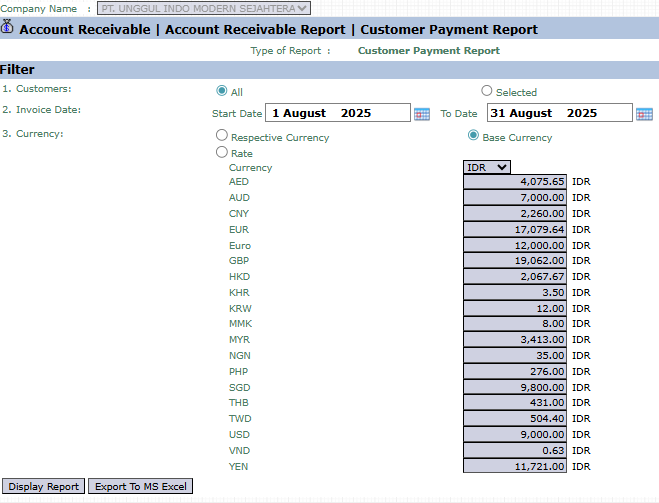
The main page of this module is a form containing various parameters to customize the report that will be generated.
Here is an explanation for each parameter:
Customers:
Select All to display payments from all customers.
Select Selected to display payments from one specific customer.
Payment Date:
Specify the Start Date and To Date range to define the payment period to be reported (e.g., August 1, 2025, to August 31, 2025).
Currency:
Choose how currency values will be displayed, either in Respective Currency (original transaction currency) or Base Currency (company's base currency).
2. Steps to Generate the Report
Step 1: Set Report Parameters
Select all the parameters you need, especially defining the payment date range.
Step 2: Generate the Report
After all parameters are set, click one of the two buttons in the bottom-left section of the page:
Display Report: To preview the payment report directly on your screen.
Export To MS Excel: To download the report data in an Excel file format.
Tips & Important Notes
Use this report to summarize the total cash receipts from customers in a day, week, or month.
This report is very helpful for the Finance and Accounts Receivable (AR) teams in the process of reconciling cash receipts with the bank statement.
To see the payment history for a single customer only, use the Selected option in the Customers filter.




No comments to display
No comments to display