The Invoice Payment Selection module is the first step in the supplier payment process. Its purpose is to review and select approved purchase invoices that are ready to be processed for payment. This module serves as a "preparation area" for the Finance team to gather and mark which invoices will be included in the next payment cycle.
1. Main View (List of Invoices Ready for Payment)
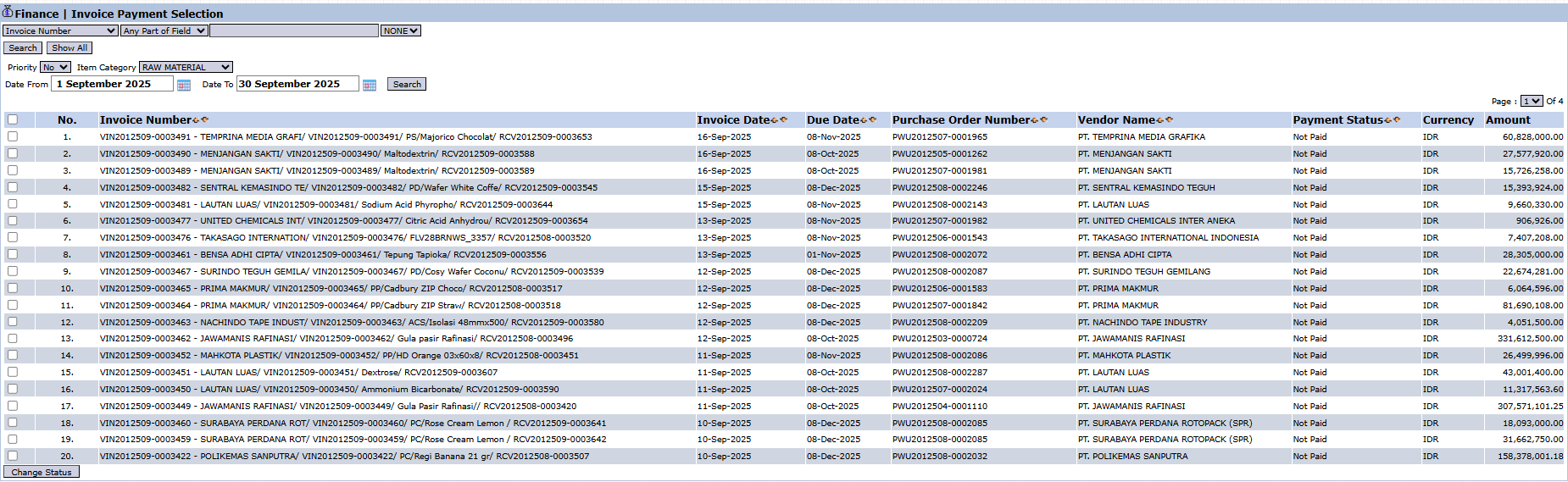
The main page of this module displays a list of all approved, unpaid purchase invoices.
View Explanation & Filters
This page is for viewing and selecting invoices to be paid.
Filters: You can search for a specific invoice by Invoice Number or a date range (Date From / To).
Invoice List: The table below displays all invoices awaiting payment, with important columns such as Invoice Number, Invoice Date, Due Date, Vendor Name, and a Payment Status showing "Not Paid".
Button Functions
Change Status: The main action button to change the status of the selected invoices, indicating that they are ready to be processed in the payment module.
2. Steps to Select Invoices for Payment
Step 1: Review Due Invoices
Use the filters and pay attention to the Due Date column to see which invoices need to be paid soon based on their due date.
Step 2: Select Invoices
Select one or more invoices to be included in the next payment cycle by checking the box in the leftmost column of the corresponding row(s).
Step 3: Change Status
After selecting all the desired invoices, click the Change Status button in the bottom-left section of the page. This action will 'send' the selected invoices to the Vendor Payment module, where the actual payment process (e.g., creating a voucher) will be carried out.
Tips & Important Notes
This module only displays purchase invoices that have passed all approval stages and still have a 'Not Paid' status.
This is a preparatory step before the actual payment process is carried out in the next module.
This module is crucial for the Finance (AP - Account Payable) team to manage cash outflow and ensure timely payments to vendors.

No comments to display
No comments to display