Report Module Guide: Transporter Cost Ratio (Purchasing)
Module Location
Purchasing > Reports > Transporter Cost Ratio
Module Objective
The Transporter Cost Ratio report module within the Purchasing menu is used to generate a report that analyzes the cost ratio of inbound logistics. This report calculates the percentage of the shipping cost against the value of the goods purchased from a supplier. This is a Key Performance Indicator (KPI) for measuring the cost-efficiency of logistics and procurement.
1. Report Parameters (Filter)
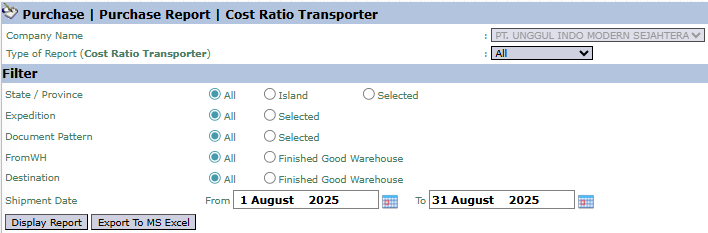
The main page of this module is a form containing various parameters to customize the report that will be generated.
Here is an explanation for each parameter:
State / Province:
Filter the report by the origin area of the shipment, whether All, per Island, or Selected (Specific Province).
Expedition:
Select the scope of shipping services, whether All or Selected (Specific Expedition).
From WH / Destination:
Filter by the origin and destination warehouses.
Shipment Date:
Specify the From and To date range to define the goods receipt period to be analyzed (e.g., August 1, 2025, to August 31, 2025).
2. Steps to Generate the Report
Step 1: Set Report Parameters
Select all the parameters you need, for example, a Shipment Date range and a specific Expedition to compare efficiency.
Step 2: Generate the Report
After all parameters are set, click one of the two buttons in the bottom-left section of the page:
Display Report: To preview the analysis report directly on your screen.
Export To MS Excel: To download the report data in an Excel file format.
Tips & Important Notes
Use this report to compare the cost-efficiency of inbound shipping among various expedition companies.
Analyzing the cost ratio per shipping origin (From WH) can help in making decisions about vendor selection or purchasing logistics strategies.
This report is an important performance measurement tool for the Logistics and Purchasing teams.





No comments to display
No comments to display