The Unmatched PO Report module is used to generate a report that identifies discrepancies between the quantity of goods ordered on a Purchase Order (PO) and the quantity of goods received on the Goods Receipt Note (LPB/RR). This report is a crucial control tool for detecting short shipments or over shipments from suppliers.
1. Report Parameters (Filter)
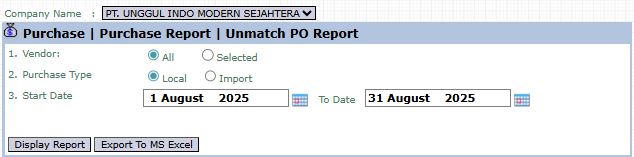
The main page of this module is a form containing various parameters to customize the report that will be generated.
Here is an explanation for each parameter:
Vendor:
Filter the report by All vendors or a Selected vendor.
Purchase Type:
Select the type of purchase you wish to display, whether Local or Import.
Start Date / To Date:
Specify the creation date range of the POs to be checked (e.g., August 1, 2025, to August 31, 2025).
2. Steps to Generate the Report
Step 1: Set Report Parameters
Define the Vendor scope, Purchase Type, and the date range.
Step 2: Generate the Report
After all parameters are set, click one of the two buttons in the bottom-left section of the page:
Display Report: To preview the unmatched PO report directly on your screen.
Export To MS Excel: To download the report data in an Excel file format.
3. Example of the Report View
After you click, the system will generate a report like the following, which details every PO that has a quantity mismatch.
Report Explanation: This report will display a list of Purchase Orders where there is a difference between the quantity ordered and the quantity received.
Key Columns for Analysis:
Purchase Order: The PO number being analyzed.
PO Quantity: The quantity ordered on the PO.
RR Qty: The quantity received at the warehouse (based on the Goods Receipt Note).
Status: Shows the status of the mismatch.
Tips & Important Notes
Use this report routinely to identify shipping problems from vendors quickly.
Every line that appears on this report requires follow-up, either by communicating with the vendor for clarification or with the warehouse team for re-verification of the receipt.
This report is crucial for the Procurement and Accounting (AP) teams to ensure the company only pays according to the quantity of goods actually received.





No comments to display
No comments to display