The AR By Customer (Account Receivable By Customer) report module is used to generate a detailed report of receivable transactions filtered for one specific customer. This report is essentially an Account Receivable Detail focused on a single customer, making it very useful for tracing transaction history on an individual basis.
1. Report Parameters (Filter)
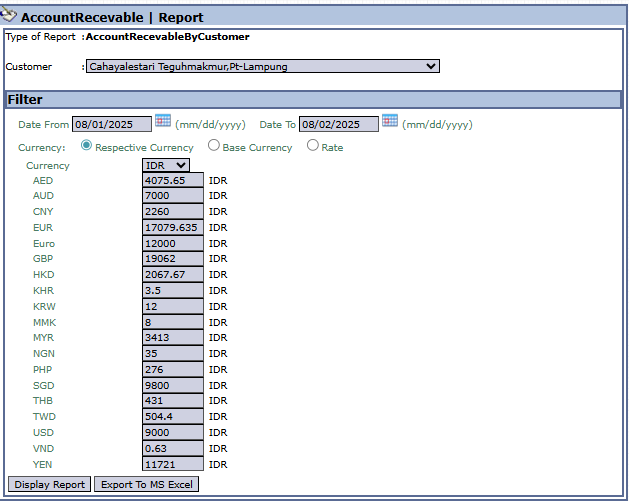
The main page of this module is a form containing several parameters to generate a report that is specific to one customer.
Here is an explanation for each parameter:
Customer:
This is the primary and mandatory filter. Select the customer whose report you want to see from the dropdown (e.g., Cahayalestari Teguhmakmur,Pt-Lampung).
Date From / Date To:
Specify the Date From and Date To range to define the period of transactions to be displayed (e.g., 08/01/2025 to 08/02/2025).
Currency:
Choose how currency values will be displayed in the report, whether in Respective Currency, Base Currency, or based on a Rate.
2. Steps to Generate the Report
Step 1: Set Report Parameters
Select the desired Customer from the list and define the date range in the Date From and Date To fields.
Step 2: Generate the Report
After the parameters are set, click one of the two buttons in the bottom-left section of the page:
Display Report: To preview the detail report directly on your screen.
Export To MS Excel: To download the report data in an Excel file format.
Tips & Important Notes
Use this report to get the complete details of all transactions (invoices, payments, credit/debit notes) for one specific customer.
This report is very useful when handling inquiries or disputes from customers regarding their account balance, as it presents a complete transaction history.
This is a more focused version of the Account Receivable Detail report.




No comments to display
No comments to display