The Transaction Journal module within Direct Selling serves as a reporting and drill-down center to display all the details of accounting journal entries that originate from activities in the direct selling channel. It is a read-only tool for the accounting and direct selling admin teams to view the financial impact of every transaction.
1. Main View (Transaction Report Center)
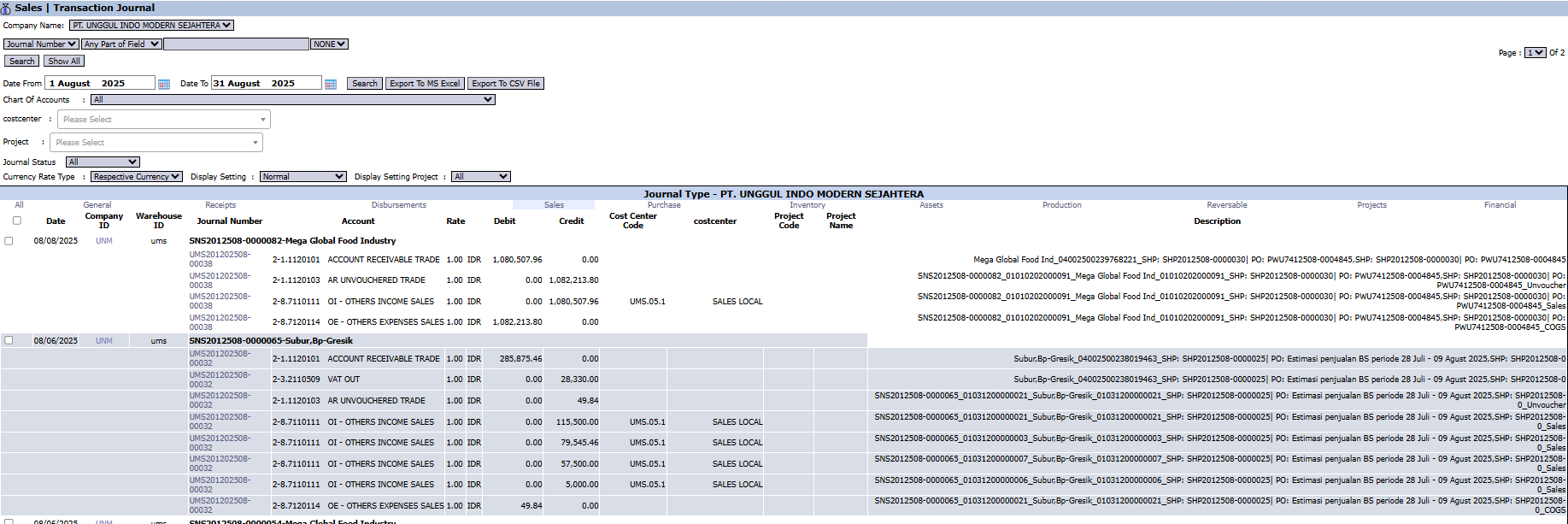
The main page of this module will be a comprehensive, interactive report, similar to the Transaction Journal modules in the General Ledger or Sales menus.
Likely Available Filters
The page will provide various advanced filters to screen the data, such as:
Journal Number or Receipt No
Date Range (Date From / Date To)
Chart of Accounts
Cost Center and Project
Likely Displayed Columns
The main table will display the details of each journal line, including:
Date
Journal Number
Account
Debit and Credit
A very detailed Description, linking to the source document.
2. Steps to Use the Report
Step 1: Set Parameters
Use the various available filters to narrow down your search. For example, use the date filter to see all direct selling transaction journals within a single month.
Step 2: Display the Report
Click the Search or Show All button to display the data in the table.
Step 3: Analyze and Export
Review the journal details displayed or click print to download the data and perform further analysis.
Workflow & Integrated Business Process
This module displays the final result of the Process Journal within the direct selling workflow.
All activities from Sales Orders, Delivery Orders, Receipts, and Returns in the direct selling channel will be reflected as journal entries here after being processed.
Tips & Important Notes
Use this report to trace the accounting impact of every direct selling transaction in detail.
This is a very useful tool for the Accounting and Direct Selling Admin teams for audit and reconciliation purposes.


No comments to display
No comments to display