The Invoice Book module serves as a reference book or directory that displays a list of customers who are associated with invoices. This module is an inquiry tool that allows users to quickly find basic information about customers who have transactions.
1. Main View (Invoice Book List)
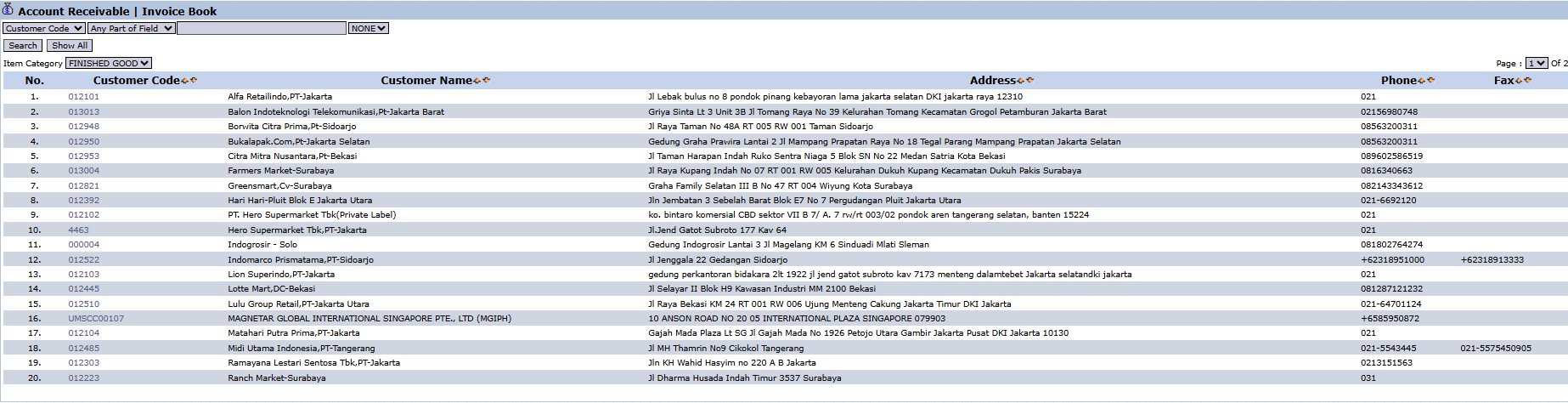
The main page of this module is a list that displays all customers along with their contact details.
View Explanation & Filters
This page is designed to make searching for customer data easy.
Customer Filter: You can search for a specific customer using the Customer Code search bar at the top.
Category Filter: There is also an Item Category filter that allows you to filter customers based on the category of products they purchase (e.g., FINISHED GOOD).
Customer List: The table below displays the search results, complete with contact details.
Column Explanation
Customer Code: The unique code for each customer.
Customer Name: The official name of the customer.
Address: The address of the customer.
Phone / Fax: The customer's phone and fax numbers.
2. Workflow & Business Process
This module is read-only or for viewing data only. You cannot create, modify, or delete customer data from here.
Use the filters at the top to quickly find a customer's contact information or address based on their code or name.
Tips & Important Notes
This module is a useful search tool for the Accounts Receivable (AR) team to get customer contact information quickly.
The Item Category filter can be useful for analyzing the customer base based on the types of products they purchase.
If you need to change or add new customer data, you must do so through the 4. Sales Module

No comments to display
No comments to display