The Transaction Journal module is the primary reporting center for all accounting activities. Its purpose is to display, search, filter, and export all journal entries from all modules that exist in the system. From this single module, you can generate various types of specific journal reports, including a Receipt Journal.
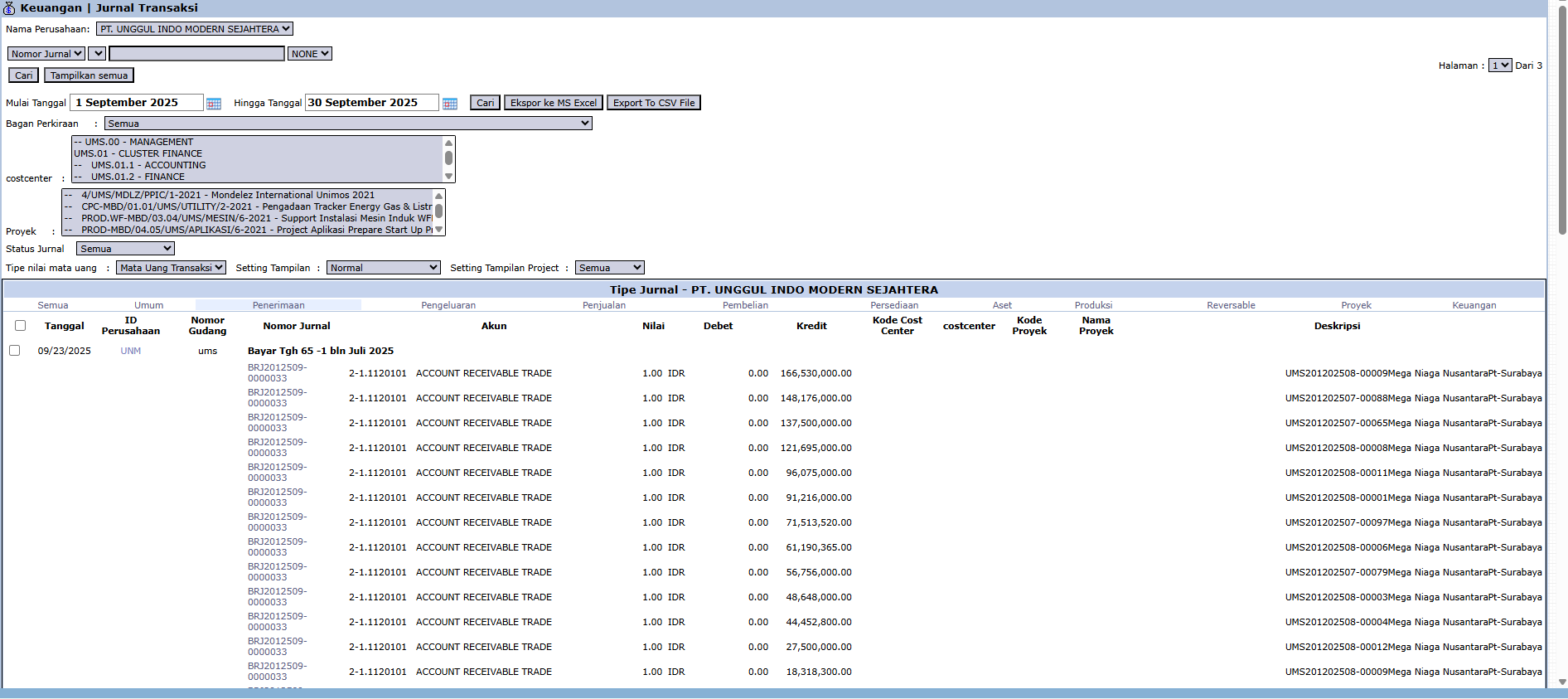
1. Main View (Transaction Report Center)
The main page of this module is a comprehensive, interactive report.
Advanced Filter Functions
The top section of the page provides various advanced filters to screen the data:
Journal Number: To search by a specific journal or source document number.
Start Date / End Date: Specify a date range to limit the transaction period.
Chart of Accounts: Filter transactions that only affect a specific account.
Costcenter / Project: Filter transactions that are only allocated to a specific department or project.
2. How to Generate a Specific Report (Example: Receipt Journal)
To create a specific report like a Receipt Journal (as you asked), you just need to use the available filters effectively.
Set the Period: Define the date range in the Start Date and End Date fields.
Filter by Account: In the Chart of Accounts filter, select the accounts related to receipts, such as all Cash and Bank accounts.
Use Built-in Filters: Under Journal Type, there is likely a special filter to select Receipt transactions.
Display Results: Click the [Search] button. The results displayed in the table will be the Receipt Journal for your selected period.
Tips & Important Notes
This module is the most powerful read-only tool for the Accounting team for conducting audits, ensuring traceability, and performing reconciliations.
By using the right combination of filters, you can generate almost any type of special journal from this single module, such as a Sales Journal, Purchase Journal, Cash Receipt Journal, and Cash Disbursement Journal.
Use the [Export to MS Excel] button to download the data and perform further analysis.

No comments to display
No comments to display