General Ledger > Report > Unvouchered Outstanding Report
Module Objective
The Unvouchered Outstanding Report module is used to generate a list of outstanding transactions that have not yet had a voucher or official invoice created for them as of a specific date. This report is an important control tool for reviewing unfinished transactions, both on the Accounts Payable (AP) and Accounts Receivable (AR) sides.
1. Report Parameters
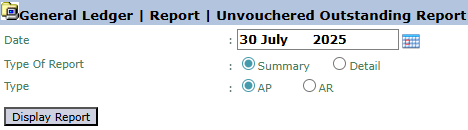
The main page of this module is a simple form containing several parameters to define the type of report that will be generated.
Here is an explanation for each parameter:
Date:
Select the end date or "cut-off" date for the report. The system will display all transactions that have not been invoiced up to this date (e.g., July 30, 2025).
Type Of Report:
Choose the desired depth of the report.
Summary: Displays the report in a summary or recap format.
Detail: Displays the report as a detailed, line-by-line list of transactions.
Type:
Choose the type of transaction you want to see.
AP (Accounts Payable): To see a list of goods receipts for which purchase invoices have not been recorded.
AR (Accounts Receivable): To see a list of goods shipments for which sales invoices have not been issued.
2. Steps to Generate the Report
Step 1: Set Report Parameters
Specify the Date, Type Of Report (Summary or Detail), and Type (AP or AR) according to the information you need.
Step 2: Generate the Report
After the parameters are set, click the Display Report button in the bottom-left section of the page to see the list of transactions.
Tips & Important Notes
This report is very important for the monthly closing process to ensure all pending transactions have been identified and properly recognized.
Use the Summary type to get a quick overview of the total unbilled value, and Detail to trace each individual transaction.
This is a key control report for the Accounting team (both AP & AR sections) to maintain data accuracy and smooth billing and payment processes.



No comments to display
No comments to display