The Consolidation Report module is used to combine the financial statements of multiple company entities (a parent and its subsidiaries) into a single, unified financial report as if they were one entity. This report is crucial for group (holding) companies to get a comprehensive overview of their combined financial position.
1. Report Parameters (Consolidation Filter)
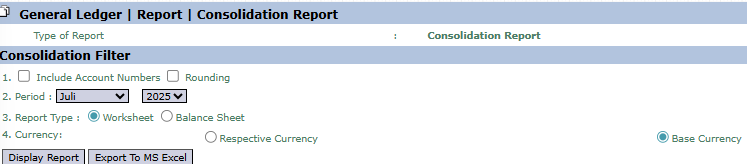
The main page of this module is a form containing various parameters to customize the consolidation report that will be generated.
Here is an explanation for each parameter:
Include Account Numbers / Rounding:
Check Include Account Numbers to display account codes on the report.
Check Rounding to round the monetary values on the report.
Period:
Select the month and year of the reporting period to be consolidated (e.g., July 2025).
Report Type:
Choose the type of consolidation report you want to generate.
Worksheet: Generates a consolidation worksheet that details the data from each individual company, the elimination entries, and the final results. This is useful for auditing and verification processes.
Balance Sheet: Generates the final, combined Consolidated Balance Sheet.
Currency:
Choose how currency values will be displayed, either in Respective Currency (original currency) or Base Currency (company's base currency).
2. Steps to Generate the Report
Step 1: Set Report Parameters
Select all the parameters you need in the Consolidation Filter section, especially making sure to define the desired Period and Report Type.
Step 2: Generate the Report
After all parameters are set, click one of the two buttons in the bottom-left section of the page:
Display Report: To preview the consolidation report directly on your screen.
Export To MS Excel: To download the report data in an Excel file format.
Tips & Important Notes
The Consolidation Report is crucial for group companies to see the combined financial position of all their subsidiaries.
To get accurate data, ensure the book-closing process in each subsidiary is complete before running this report.
Use the Worksheet report type to trace and verify elimination entries (e.g., the elimination of intercompany transactions) that are made during the consolidation process.
This module is generally used by the Accounting team at the corporate or holding company level.




No comments to display
No comments to display