The Tax Withholding (Tax Minus Summary) module is used to record and manage tax withholding transactions on payments made to suppliers (vendors). This module is generally used to manage the withholding of Income Tax (PPh), such as PPh Article 23 on services, where the company as the buyer is obligated to withhold tax before paying the vendor in full.
1. Main View (Tax Withholding List)
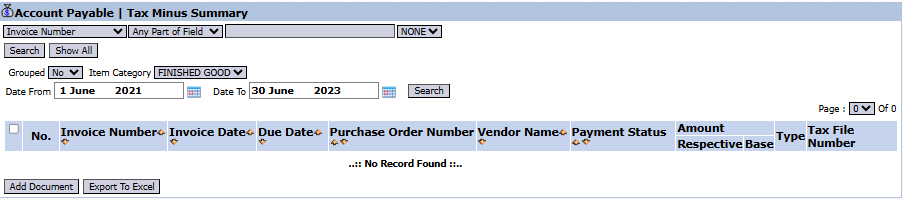
The main page of this module displays a list of all tax withholding documents that have been created.
View Explanation & Filters
This page is for viewing and managing all tax withholding documents.
Filters: You can search for a specific document by Invoice Number, Item Category, or a date range (Date From / Date To).
Document List: The table below will display all documents that match the filters, with columns such as Invoice Number, Vendor Name, Payment Status, and Tax File Number (Withholding Slip Number).
Button Functions
Add Document: The primary button to create or record a new tax withholding document.
Export To Excel: To download the list of documents into an Excel format.
2. Steps to Record a Tax Withholding
Step 1: Create a New Document
From the Main View, click the Add Document button to open the new entry form.
Step 2: Fill in Withholding Details
On the form that appears (not shown in the image), you will be asked to fill in the necessary details:
Select the Vendor and the Invoice Number for which tax will be withheld.
Select the relevant tax type (e.g., PPh 23).
Enter the tax base and calculate the tax value to be withheld from the total payment.
Step 3: Save the Document
Save the document to record this tax withholding transaction. This document will become a reference when making payments to the vendor and when remitting the PPh tax to the state treasury.
Tips & Important Notes
This module is crucial for the Tax and Customs and Accounting (AP - Account Payable) teams to manage their PPh withholding obligations.
The document created here will become the basis for:
Reducing the amount paid to the vendor.
Remitting the withheld PPh tax to the state treasury.
Issuing a withholding tax slip for the vendor.
Ensure you select the correct tax type and rate in accordance with applicable tax regulations.

No comments to display
No comments to display