Purchasing > Purchase Order > Purchase Analysis Report
Module Objective
The Purchase Order Analysis report module is a powerful business analysis tool for the Purchasing department. Its purpose is to generate a detailed report of all purchase orders that not only displays transaction data but also provides a comparison of historical prices and tracks the document flow from requisition to receipt.
1. Report Parameters
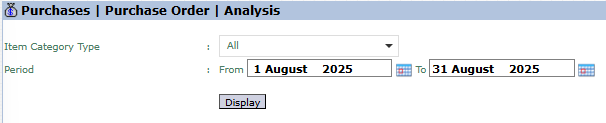
The main page of this module is a simple form containing several parameters to customize the report that will be generated.
Here is an explanation for each parameter:
Item Category Type:
Use this dropdown to filter the report by the type of item category you wish to analyze.
Period:
Specify the From and To date range to define the period of the Purchase Orders to be analyzed (e.g., August 1, 2025, to August 31, 2025).
2. Steps to Generate the Report
Step 1: Set Report Parameters
Select the Item Category Type and define the Period range.
Step 2: Generate the Report
After the parameters are set, click the Display button to view the analysis report.
3. Reading the Purchase Analysis Report
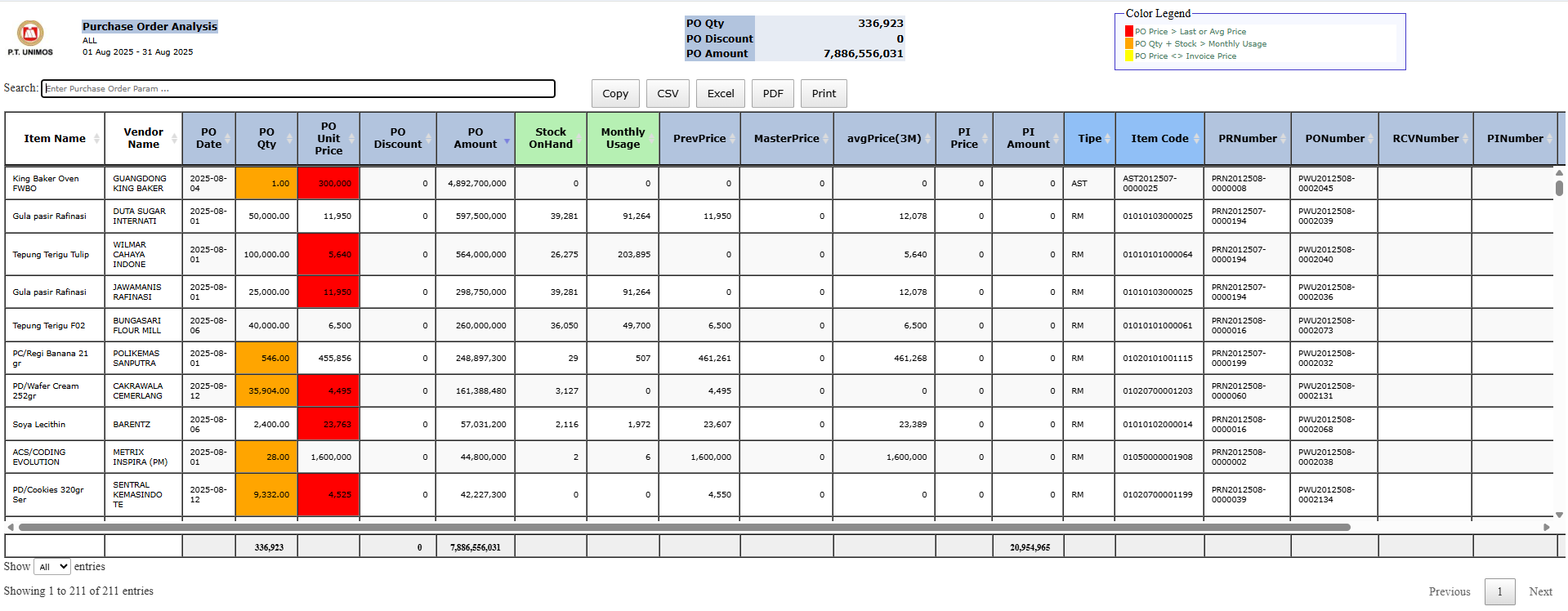
The generated report will display a highly detailed and interactive data matrix.
Report Explanation: This report presents an in-depth purchasing analysis in an interactive table format, which can be sorted and filtered directly within it.
Key Analysis Columns:
PO Unit Price: The actual purchase price on the PO.
PrevPrice: The previous purchase price for the same item.
MasterPrice: The standard or master price stored in the system.
avgPrice(3M): The average purchase price in the last 3 months.
Document Tracing Columns:
The PRNumber (Purchase Requisition Number), PONumber (PO Number), and RCVNumber (Goods Receipt Number) columns allow you to track the complete document flow for each transaction.
Report Features:
This report is equipped with export buttons for various formats such as CSV, Excel, and PDF.
Tips & Important Notes
Use this report to analyze price variance. Compare the PO Unit Price with the MasterPrice or avgPrice(3M) to identify purchases where the price has increased, decreased, or deviated from the standard.
This report is crucial for Purchasing Managers to evaluate buyer performance and the effectiveness of price negotiations with vendors.
The document tracing columns are very useful for internal audit purposes.



No comments to display
No comments to display