The Upload Data Forecast module serves as a tool to upload or import sales forecast data in bulk into the system. This process uses a file in CSV (Comma-Separated Values) format, which allows for the efficient input of large amounts of data, especially for data that comes from external parties like distributors.
1. Main View and Parameters
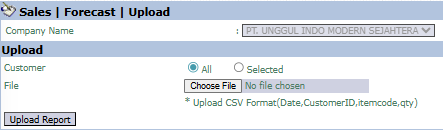
The main page of this module is a simple form for performing the file upload process.
Here is an explanation for each parameter:
Customer:
Select the customer scope. The All option is likely used if your CSV file contains data from many customers.
File:
Use the Choose File button to find and select the CSV file from your computer that contains the forecast data.
Upload File Format (Important!)
To ensure the data can be uploaded successfully, your file must be in CSV format and have 4 columns with the following exact order and names:
Date (Forecast date)
CustomerID (Customer Code)
itemcode (Product Code)
qty (Forecast quantity amount)
2. Steps to Upload Forecast Data
Step 1: Prepare and Select the File
Prepare your forecast data in a CSV file according to the instructions above. Then, on the module page, click the Choose File button to find and select that file from your computer.
Step 2: Start the Upload Process
After the file is selected, click the Upload Report button in the bottom-left section to start the process of uploading the data into the system.
Step 3: Verification
After the upload process is complete, you must verify that the data has been entered correctly. Open the Sales Forecast or Distributor Sales Forecast module to see the data you just uploaded.
Tips & Important Notes
Upload failures are most often caused by an incorrect CSV file format. Ensure the column names and their order are an exact match.
Successfully uploaded data will likely go to the Sales Forecast Inbox first for an approval process before it becomes official forecast data.
This module is very efficient for importing forecast data that is received routinely from external parties like distributors



No comments to display
No comments to display