The Purchase Register Report module is used to generate a "register book" or a detailed transactional record of all purchasing activities. This report can be generated based on a Purchase Order or an Invoice, thereby providing a complete record of all purchases within a single period.
1. Report Parameters (Filter)
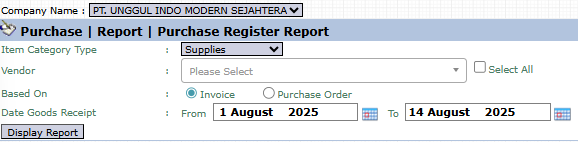
The main page of this module is a form containing various parameters to customize the report that will be generated.
Here is an explanation for each parameter:
Vendor:
Use this dropdown to select a specific vendor or leave it blank for all vendors.
Based On:
A key filter to determine the data basis for the report:
Invoice: Displays the register based on purchase invoices that have already been recorded.
Purchase Order: Displays the register based on purchase orders that have been created.
Date Goods Receipt:
Specify the From and To goods receipt date range to define the report's period (e.g., August 1, 2025, to August 14, 2025).
2. Steps to Generate the Report
Step 1: Set Report Parameters
Select the Vendor scope, the Based On report basis, and define the date range.
Step 2: Generate the Report
After all parameters are set, click the Display Report button in the bottom-left section of the page to see the report.
3. Example of the Report View
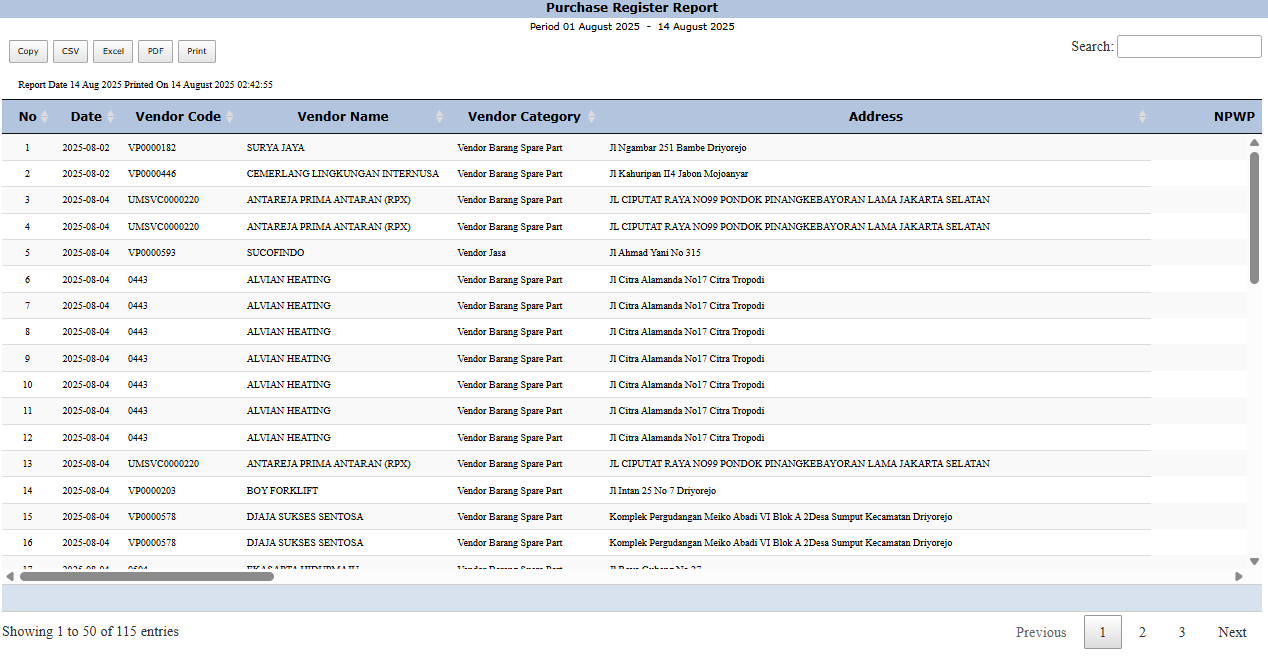
After you click, the system will generate a detailed report like the following, which details every purchase transaction.
Report Explanation: This report displays a list of all purchase transactions in detail and in sequence, functioning as a "purchasing diary".
Key Columns:
Date: The date of the transaction.
Vendor Code, Vendor Name, Vendor Category: Detailed information about the supplier.
The report will also include the item details, quantity, and value of each transaction.
Tips & Important Notes
Use this report as a "purchasing diary" for audit purposes or for summarizing daily/weekly/monthly transactions.
The Based On selection is very important. Choose Invoice to see what has become an official liability, and Purchase Order to see the purchasing commitments that have been made.
This is an important operational report for the Procurement and Accounting (AP) teams.



No comments to display
No comments to display