The Direct Selling Bank Receipt (Direct Sales Receipt Bank) module is used to consolidate multiple individual payment proofs received from direct selling customers into a single bank receipt document. This module is a critical step for the reconciliation process, which is matching the total money received in the field with the total money deposited into the company's bank account.
1. Main View (Bank Receipt List)
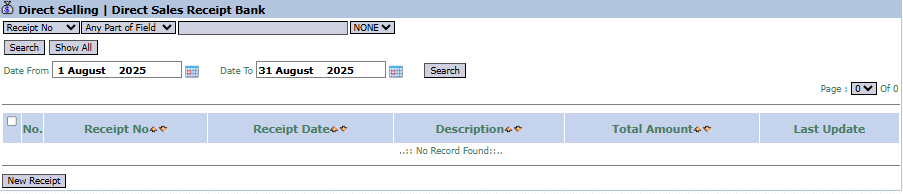
The main page of this module displays a list of all Direct Selling Bank Receipt documents that have been created.
View Explanation & Filters
This page is for viewing and managing all deposit documents.
Filters: You can search for a specific document by Receipt No or a date range (Date From / Date To).
Receipt List: The table below will display all deposit documents that match the filters, with columns such as Receipt No, Receipt Date, Description, and Total Amount.
Button Functions
New Receipt: The primary button to create a new Bank Receipt document.
2. Steps to Record a Bank Receipt
Step 1: Create a New Receipt Document
From the Main View, click the New Receipt button to open the Add Direct Sales Receipt Bank form.
Step 2: Fill in Header Information
On the form that appears, fill in the general deposit information:
Receipt Date: Enter the date the money was deposited into the bank (e.g., August 11, 2025).
Description: Provide a clear description, for instance, "Deposit from canvassing sales in Surabaya area August 11, 2025".
Step 3: Select the Payments to be Deposited
Click the [+- Multiple Select] link to open the List of Payment window.
In the pop-up window that appears, you will see a list of individual payments that have been recorded in the Direct Selling Payment Entry module but have not yet been reconciled.
Select all the payments that were deposited at the same time by checking the box in the leftmost column.
Click the Close button to return to the main form.
Step 4: Save the Receipt Document
The payments you selected in the previous step will now appear in the detail table.
Verify that the Total Amount matches the amount of money that was deposited.
Click the Save button to save the Bank Receipt document.
Tips & Important Notes
This module is the final step in the direct selling cash cycle, linking payments received in the field with physical deposits to the bank.
To simplify the reconciliation process with the bank statement, ensure you only select payments that were actually deposited together in a single bank receipt document.
This module is crucial for the Finance and Accounting teams for cash control.






No comments to display
No comments to display