
Report Shipping Instruction
Report Module Guide: Shipping Instruction Report
Module Location
Sales > Reports > Delivery Report > Report Shipping Instruction
Module Objective
The Shipping Instruction Report module is used to generate a summary report that aggregates the total product demand from all Shipping Instruction documents within a specific period. This report presents the demand data alongside inventory data and Job Order data, making it very useful for production planning and order fulfillment.
1. Report Parameters
The main page of this module is a simple form containing a date parameter for the report.

Here is an explanation for each parameter:
-
Date Shipping Instruction:
-
Specify the From and To date range to accumulate the demand from all Shipping Instructions created within that period (e.g., August 1, 2025, to August 7, 2025).
-
2. Steps to Generate the Report
Step 1: Set Report Parameters
Define the date range in the Date Shipping Instruction fields.
Step 2: Generate the Report
After the parameters are set, click one of the two buttons at the bottom:
-
Display Report: To preview the report directly on your screen.

-
Export To MS Excel: To download the report data in an Excel file format.

3. Example of the Report View
After you click, the system will generate a detailed report like the following, which details the demand per product.
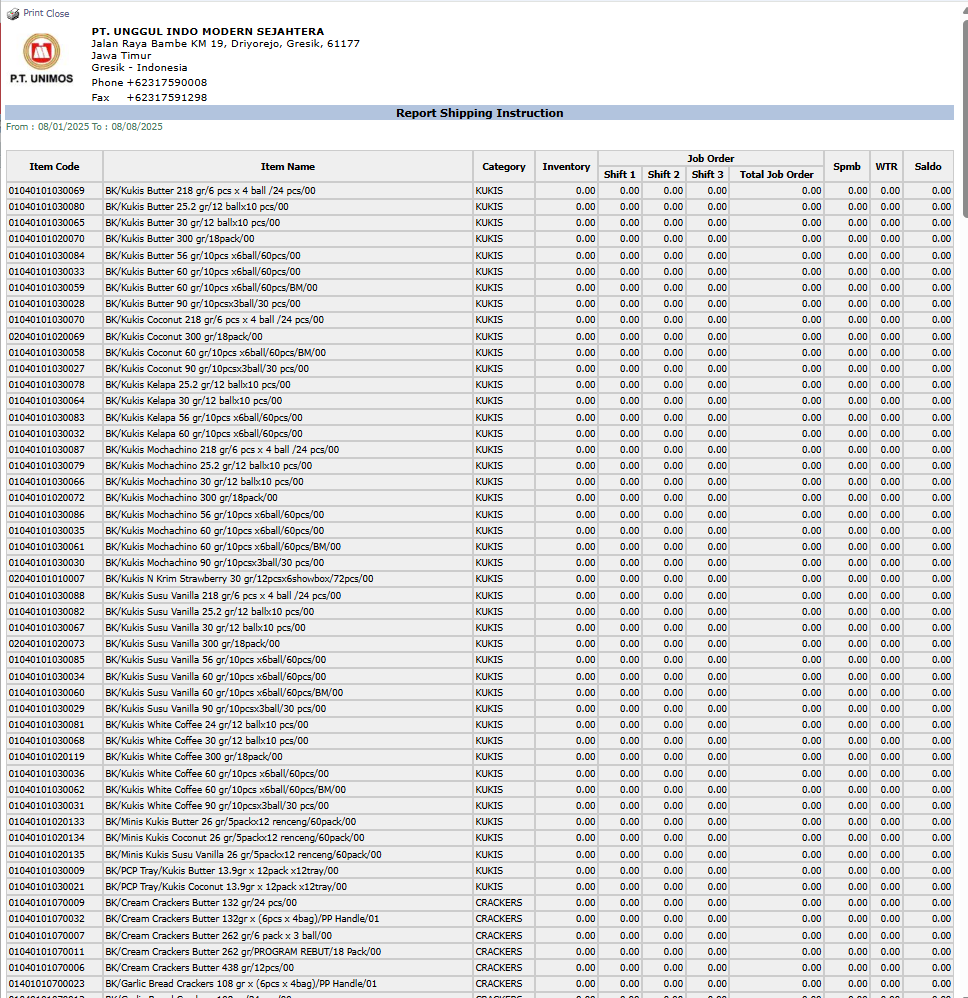
Report Explanation: This report displays a list of products grouped by category (KUKIS, CRACKERS, etc.).
Key Columns:
-
Item Code and Item Name: Details of the product requested in the shipping instructions.
-
Inventory: The quantity of stock available in the warehouse for that product.
-
Job Order: Details of the production work orders (Shift 1, Shift 2, Shift 3) for this product, which shows the current production plan.
-
Balance: Likely shows the final balance after considering the demand, existing stock, and production plans.
Tips & Important Notes
-
Although named 'Shipping Instruction Report', this report is more focused on analysis from the production and inventory side to meet the total shipping demand.
-
This report is a crucial tool for the PPIC (Production Planning and Inventory Control) team to ensure product availability and plan the production schedule to match sales demand.
-
Use this report to see the big picture of the total product demand generated by the sales team in a single period.
No comments to display
No comments to display