The Performance Each AO (Account Officer) report module is used to generate a report that analyzes the performance of each salesperson. This report summarizes their activities and work results based on the opportunity data they manage. It is an important tool for sales managers to conduct evaluations, provide coaching, and measure team achievements.
1. Report Parameters
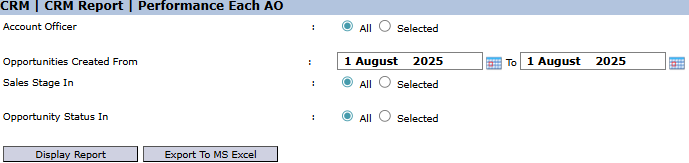
The main page of this module is a form containing various parameters to customize the performance report that will be generated.
Here is an explanation for each parameter:
Account Officer:
Select All to display the performance report for all salespeople, or select Selected to choose one or more specific salespeople to be evaluated.
Opportunities Created From / To:
Specify the opportunity creation date range to define the performance evaluation period (e.g., August 1, 2025).
Sales Stage In:
Filter the report to only display opportunities that are in a specific sales stage. Select All to include all stages.
Opportunity Status In:
Filter the report based on the final status of the opportunities. For example, select "Won" to see the win-rate, or "Lost" to see failed opportunities. Select All to include all statuses.
2. Steps to Generate the Report
Step 1: Set Report Parameters
Select all the parameters you need to focus the report. For example, to see a salesperson's winning performance last month, select the Account Officer's name, set the date range to the previous month, and set the Opportunity Status In to "All".
Step 2: Generate the Report
After all parameters are set, click one of the two buttons in the bottom-left section of the page:
Display Report: To preview the performance report directly on your screen.
Export To MS Excel: To download the report data in an Excel file format.
Tips & Important Notes
This report is a primary evaluation tool for Sales Managers to objectively assess the performance of each member of their team based on data.
To see how many deals a salesperson won in a specific period, set the date range and filter the Opportunity Status In to "Won".
The accuracy of this report is highly dependent on the salesperson's discipline in managing data in the Opportunity Module, especially in updating its status to "Won" or "Lost" when a deal is concluded.




No comments to display
No comments to display