The Bank Reconciliation module serves as a tool to match and align the company's internal cash/bank transaction records (recorded in the General Ledger) with the transaction records on the statement from the bank. This process is crucial for ensuring the accuracy of the company's cash balance, identifying unrecorded transactions, and detecting any errors or discrepancies.
1. Main View (Reconciliation List)
The main page of this module displays a list of all Bank Reconciliation documents that have been created.
View Explanation & Filters
This page is for viewing the history of reconciliations that have been performed.
Filters: You can search for a specific reconciliation document by Bank Reconciliation Number or a date range (Start Date / End Date).
Reconciliation List: The table below will display all documents that match the filters, with columns such as Bank Reconciliation Number, Account Name, and Bank Statement Date.
Button Functions
[New]: The primary button to start a new Bank Reconciliation process.
[Cancel]: To cancel a reconciliation document that has already been created.
2. Steps to Perform a Bank Reconciliation
Step 1: Start a New Reconciliation
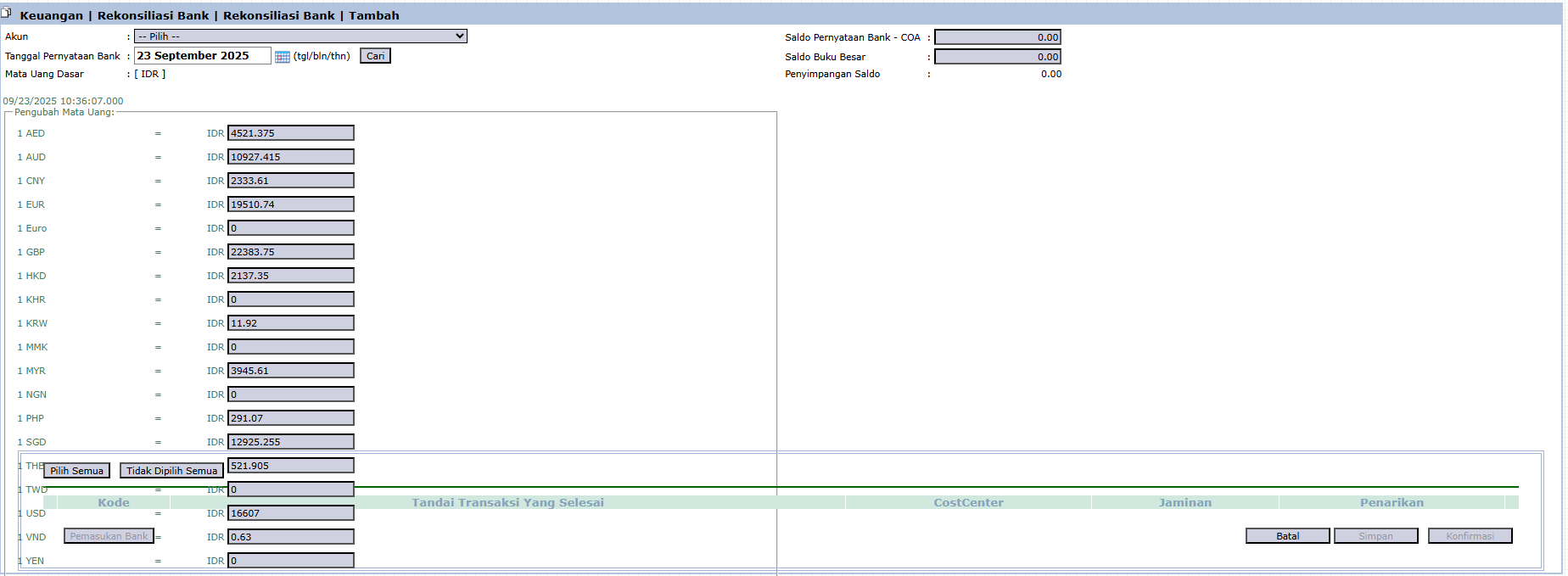
From the Main View, click the [New] button to open the reconciliation form.
Step 2: Fill in Initial Information
Account: Select the bank account to be reconciled from the dropdown.
Bank Statement Date: Enter the end date from the bank statement (e.g., September 23, 2025).
Bank Statement Balance - COA: Enter the ending balance as it appears on the bank statement.
The system will display the General Ledger Balance (the balance according to internal records) and calculate the Balance Discrepancy (the difference).
Step 3: Match Transactions (Clearing)
The system will display two lists of transactions: transactions that are not yet "cleared" in the company's records and transactions that are not yet "cleared" in the bank's records.
Your task is to check all matching transactions (those that appear on both records) in the "Mark Cleared Transactions" column. This process is called clearing.
Step 4: Handle Differences
Transactions on Bank, Not in Books: For transactions that are on the bank statement but not yet in the General Ledger (e.g., bank administration fees, interest income), you must create adjusting journal entries.
Transactions in Books, Not on Bank: Transactions that are in the General Ledger but have not yet appeared on the bank statement (e.g., outstanding checks or deposits in transit) will remain as outstanding items until the next period.
Step 5: Save and Confirm
Continue the matching process until the Balance Discrepancy becomes zero. After that, click [Save] or [Confirm] to complete and save the reconciliation report.
Tips & Important Notes
Bank reconciliation is a mandatory internal control procedure that should be performed routinely (usually monthly).
The primary goal of this process is to ensure the Balance Discrepancy becomes zero, which indicates that all differences have been identified and explained.
This module is a primary work tool for the Accounting and Treasury teams.


No comments to display
No comments to display