The Customer Sales Report module is used to generate a detailed report that displays all sales transactions, grouped by customer. This report is very useful for analyzing the purchasing patterns and total sales volume of each customer within a specific time period.
1. Report Parameters (Filter)
The main page of this module is a form containing various parameters to customize the report that will be generated.
Here is an explanation for each parameter:
Customer Active/Not Active:
Filter customers by their active status, whether All, Active, or Not Active.
Customer:
Select the customer scope for the report: All, Category (by Category), or Selected (for a specific Customer).
Customer Date:
Specify the From and To date range to define the period of sales transactions to be displayed (e.g., August 1, 2025, to August 31, 2025).
Document Active Status:
Use this dropdown to filter by the active status of the sales documents.
2. Steps to Generate the Report
Step 1: Set Report Parameters
Select all the parameters you need, especially defining the Customer Date range and the Customer scope.
Step 2: Generate the Report
After all parameters are set, click one of the two buttons in the bottom-left section of the page:
Display Report: To preview the customer sales report directly on your screen.
Export To MS Excel: To download the report data in an Excel file format.
3. Example of the Report View
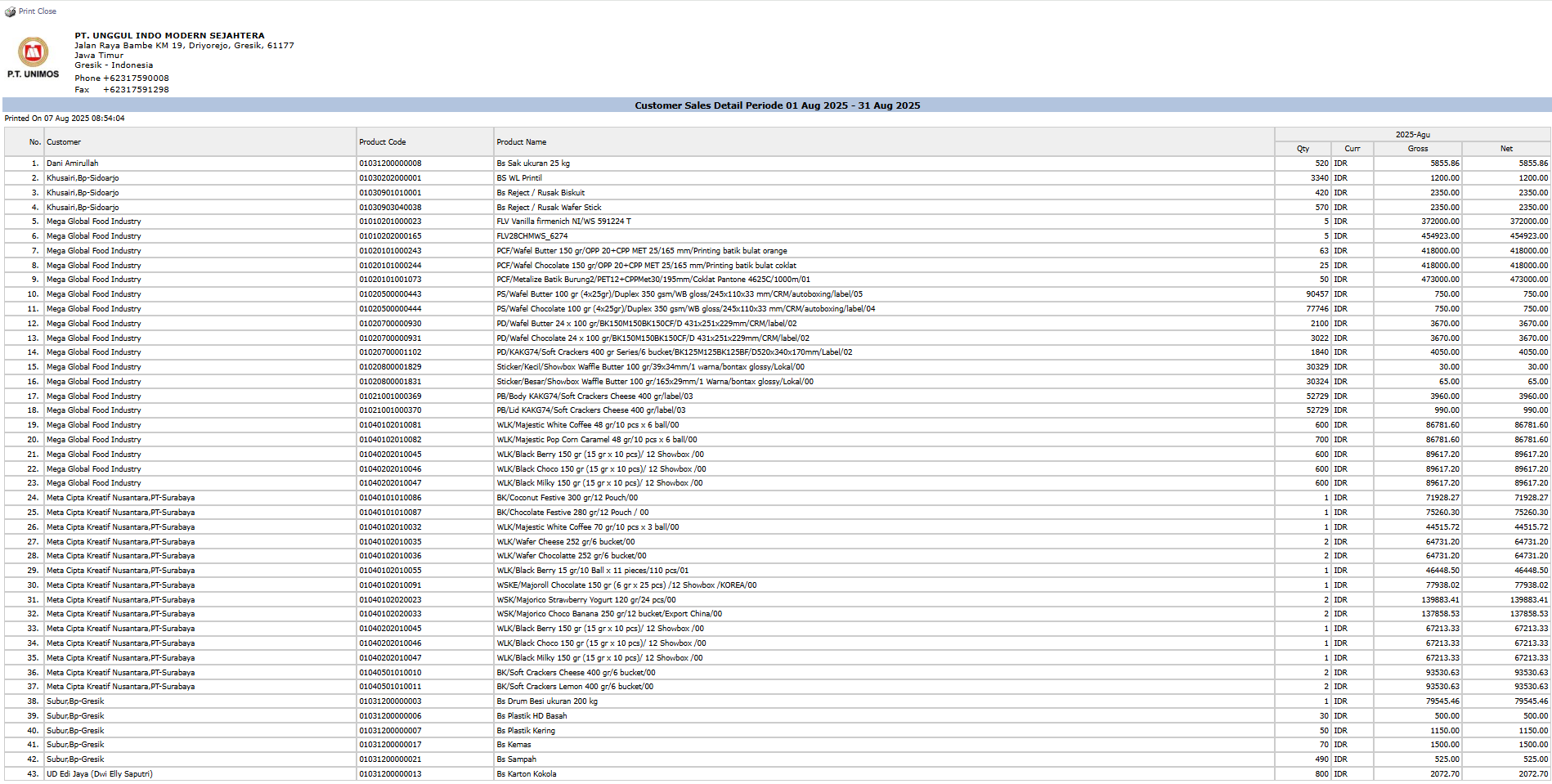
After you click, the system will generate a detailed report like the following, which details every product purchased by each customer.
Report Explanation: This report displays a detailed list of each sales transaction, sorted or grouped by Customer.
Key Columns:
Product Code and Product Name: Shows which products were purchased.
Qty: The number of units purchased.
Gross: The gross sales value.
Net: The net sales value after discounts or other adjustments.
Tips & Important Notes
Use this report to analyze which products are most frequently purchased by a specific customer.
This report is very useful for the Sales team, especially Account Officers, to review the activity and sales volume on the accounts they manage.
Filtering by a Selected Customer is very useful for preparing data before a customer visit or business meeting.





No comments to display
No comments to display