The Invoice Payment Report module is used to generate a comprehensive report that tracks the status of all purchase invoices received from suppliers (vendors). This report is a primary work tool for managing the payable payment cycle, from viewing unpaid invoices to those that are fully paid.
1. Report Parameters (Filter)
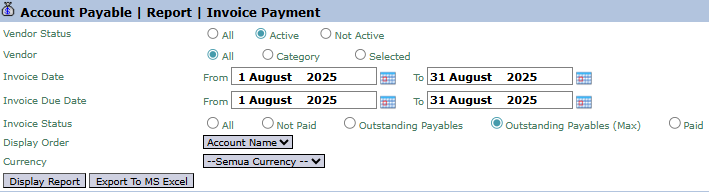
The main page of this module is a form containing various parameters to customize the report that will be generated.
Here is an explanation for each key parameter:
Vendor:
Filter the report by All vendors, Category, or a Selected (Specific Vendor).
Invoice Date / Invoice Due Date:
Use these filters to search for invoices based on their issue date range (Invoice Date) or their due date range (Invoice Due Date).
Invoice Status:
A very important filter to select invoices based on their payment status, such as Not Paid, Outstanding Payables, or Paid.
Display Order:
Choose the criteria for sorting the data on the report, for example, by Account Name (Vendor Name).
2. Steps to Generate the Report
Step 1: Set Report Parameters
Select all the parameters you need, especially defining the Invoice Status and the relevant date range.
Step 2: Generate the Report
After all parameters are set, click one of the two buttons in the bottom-left section of the page:
Display Report: To preview the invoice payment report directly on your screen.
Export To MS Excel: To download the report data in an Excel file format.
3. Example of the Report View
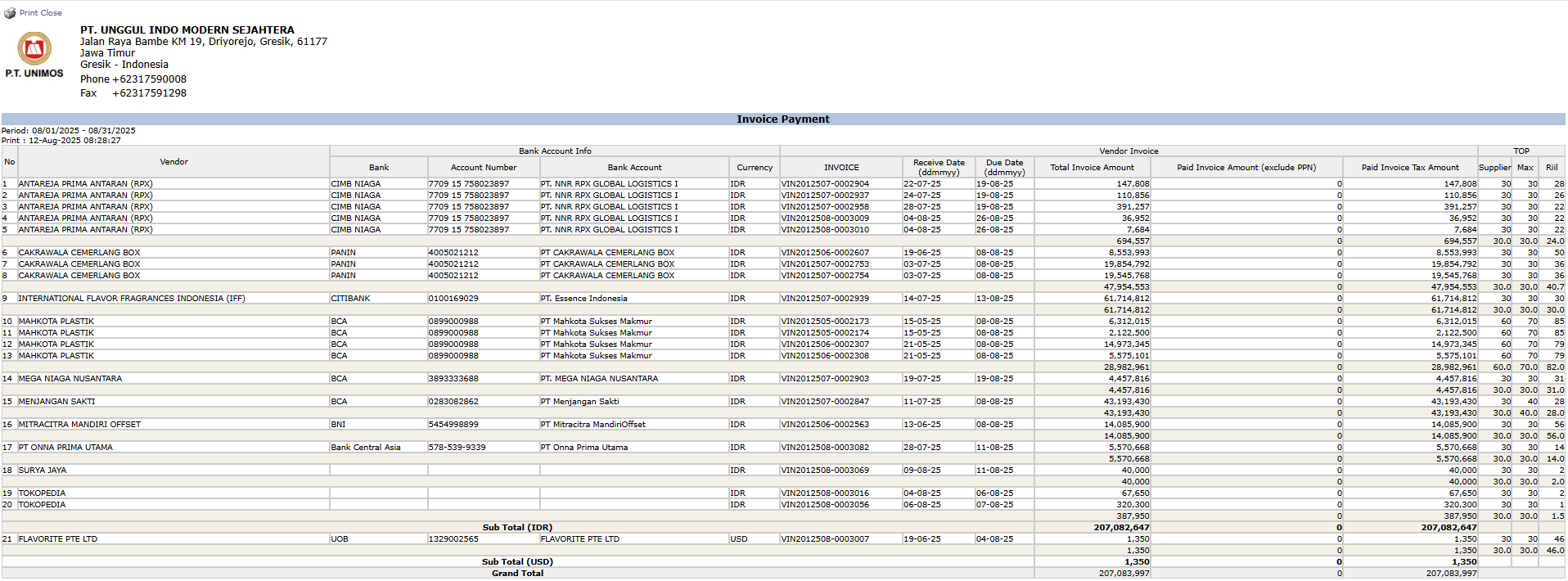
After you click, the system will generate a detailed report like the following, which details every invoice and its payment status.
Report Explanation: This report displays a detailed list of every purchase invoice from vendors.
Key Columns:
Vendor: The name of the supplier.
INVOICE: This section details the Receive date, Due date, and Total Invoice Amount.
Paid Invoice Amount (exclude PPN): Shows the amount that has already been paid for that invoice.
Tips & Important Notes
Use the Invoice Status filter with the 'Outstanding Payables' option to create a worklist of invoices that need to be scheduled for payment soon.
This report is very important for the Accounting (AP - Account Payable) and Finance teams to manage payment schedules and maintain good relationships with vendors.
The Export to MS Excel feature is useful for creating weekly or monthly payment plans.



No comments to display
No comments to display