The Cash Receipt module is a transactional module specifically used to record all receipts of money in the form of physical cash. Its main function is to apply cash payments received from customers against one or more outstanding sales invoices, thereby settling the receivable.
1. Main View (Cash Receipt Entry Form)
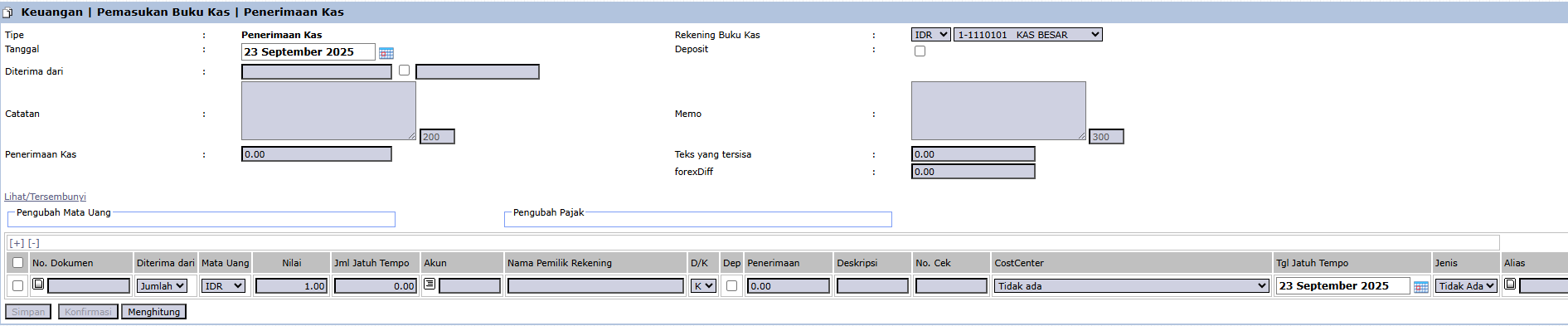
The main page of this module is a form for inputting the details of a cash receipt. The process begins by creating a new document which will then be displayed in the Cash/Bank Inflow List module.
2. Steps to Record a Cash Receipt
Step 1: Fill in Header Information
At the top of the form, fill in the main details of the cash receipt:
Type: Select the type of inflow, in this case, Cash Receipt.
Date: Enter the date the cash was received (e.g., September 22, 2025).
Cash Receipt: Enter the total amount of cash received.
Cash Book Account: Important! Select the company's cash account that received the funds from the dropdown (e.g., MAIN CASHIER).
Notes / Memo: Provide any relevant descriptions or notes.
Step 2: Allocate the Payment to Invoices
In the detail table at the bottom, you will detail which invoices are being settled by this cash payment:
Click the [+] icon to add a new row.
In the Document No. column, find and select one or more sales invoice numbers that are being settled by this payment.
Once selected, the system will automatically fill in details like Received from (customer name) and Value (invoice bill amount).
Ensure the total Value in the detail table equals the Cash Receipt amount in the header.
Step 3: Verify and Confirm
After all data is filled in and the allocation is correct, use the buttons in the bottom-left section:
Save: To save the transaction as a draft.
Confirm: To finalize and post the transaction into the system.
Workflow & Integrated Business Process
Transactions recorded here will officially settle receivables originating from Sales Invoices.
After being Confirmed, this document will appear in the Cash/Bank Inflow List and will automatically create an accounting journal entry (e.g., a Debit to the Cash account and a Credit to the Accounts Receivable account).
Tips & Important Notes
This module is functionally very similar to the Bank Receipt module, but is specifically used for cash transactions.
To maintain the accuracy of physical cash records, ensure you select the correct Cash Book Account (e.g., 'PETTY CASH' for small operations vs 'MAIN CASHIER' for the main cashier).

No comments to display
No comments to display