The Linked Account Report module for Purchasing is used to display the mapping or "linking" between each supplier (vendor) and their specific accounts in the General Ledger. This report is a crucial verification tool for the accounting team to ensure that every vendor has been connected to the correct GL accounts for various types of payable transactions.
1. Report Parameters (Filter)
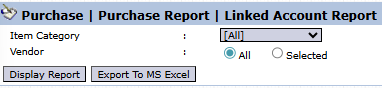
The main page of this module is a simple form containing several parameters to customize the report that will be generated.
Here is an explanation for each parameter:
Item Category:
Use this dropdown to filter vendors based on the product category they supply.
Vendor:
Filter the report by All vendors or a Selected vendor.
2. Steps to Generate the Report
Step 1: Set Report Parameters
Select the parameters you need to focus the report.
Step 2: Generate the Report
After all parameters are set, click one of the two buttons in the bottom-left section of the page:
Display Report: To preview the linked account report directly on your screen.
Export To MS Excel: To download the report data in an Excel file format.
3. Example of the Report View
After you click, the system will generate a detailed report like the following, which details the account links per vendor.
Report Explanation: This report displays a matrix of the account links for each vendor.
Rows: Each row represents one vendor (Account Name).
Columns: The main columns, such as Liability Account for Tracking Payables, Account for Vendor Down Payment, and Account for Vendor Deposits, show the transaction types, along with the linked GL account for each.
Workflow & Integrated Business Process
This report is a reflection of the settings configured in the Purchasing > Supplier > Vendor Category module.
The Accounting team should use this report periodically to verify that all vendors are linked to the correct GL accounts to ensure the integrity of the financial statements.
Tips & Important Notes
If you find a vendor whose 'Account Link' is incorrect or empty in this report, immediately correct the settings in the Vendor Category module or the vendor master data.
This report is an important audit tool to ensure the automated journaling process for the purchasing cycle is functioning correctly.




No comments to display
No comments to display