The AR/AP Adjustment module is a special accounting tool used to perform a "netting" process. Netting is the process of offsetting an Accounts Receivable (AR) balance with an Accounts Payable (AP) balance for the same entity, which acts as both a customer and a supplier.
1. Main View (Adjustment List)
The main page of this module displays a list of all AR/AP Adjustment documents that have been created.
View Explanation & Filters
This page is for viewing the history of adjustment/netting transactions that have been performed.
Filters: You can search for a specific document by Document Number or a date range (Start Date / End Date).
Adjustment List: The table below will display all documents that match the filters, with columns such as Document Number, Document Date, and Document Status.
Button Functions
[New]: The primary button to create a new AR/AP Adjustment document.
[Cancel]: To cancel an adjustment document that has already been created.
2. Steps to Perform an Adjustment (Netting)
Step 1: Create a New Adjustment Document
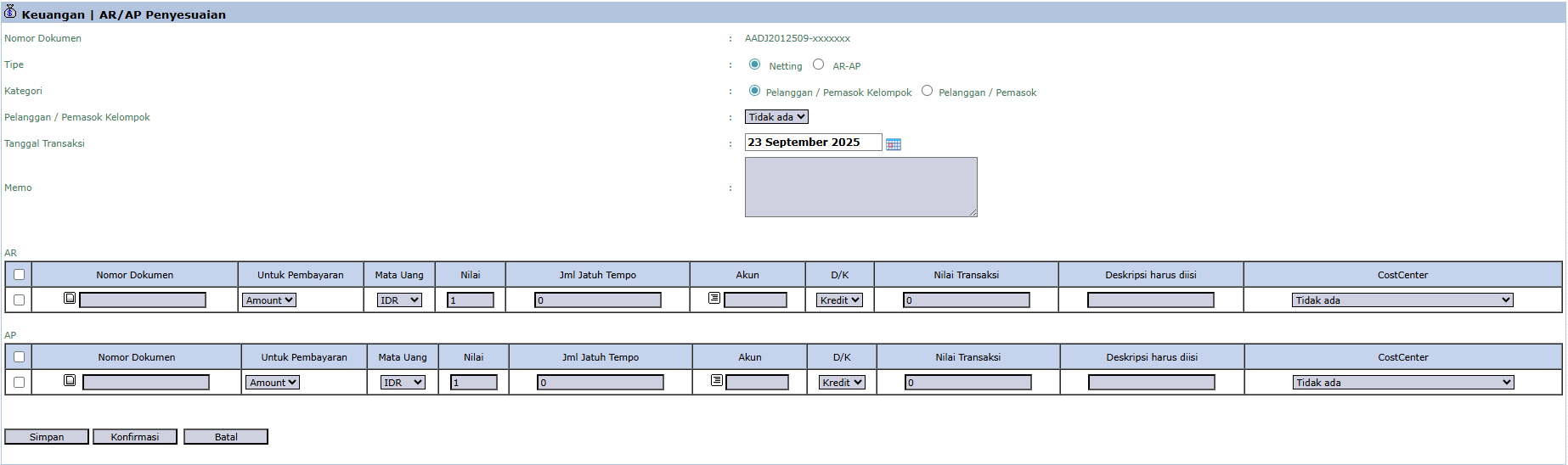
From the Main View, click the [New] button to open the AR/AP Adjustment form.
Step 2: Fill in Header Information
Type: Select the type of adjustment, for example, Netting.
Category: Select whether you will perform netting for a specific Customer / Supplier or a Group.
Customer / Supplier Group: Select the entity to be netted.
Transaction Date: Enter the effective date of this adjustment transaction.
Step 3: Select Receivable (AR) Documents
In the AR section, select one or more outstanding sales invoices from that customer that you want to use to reduce the payable.
Step 4: Select Payable (AP) Documents
In the AP section, select one or more outstanding purchase invoices from that supplier that you want to reduce with the receivable above.
Step 5: Save and Confirm
After selecting all the relevant documents, the system will calculate the totals. Verify the amounts, then click the [Confirm] button to process the adjustment. This action will create a journal entry that debits Accounts Payable (AP) and credits Accounts Receivable (AR).
Tips & Important Notes
This is an advanced accounting tool and must be used with a proper understanding. Always ensure a valid netting agreement exists with the customer/supplier.
After confirmation, this transaction will effectively "settle" part or all of the selected receivable and payable balances.
This is an efficient way to settle transactions with business partners who have a two-way relationship (as both a buyer and a seller).


No comments to display
No comments to display