
Account Receivable Detail
Report Module Guide: Account Receivable Detail
Module Location
Accounts Receivable > Reports > Account Receivable Detail
Module Objective
The Account Receivable Detail report module is used to generate a highly detailed list of all transactions that affect accounts receivable within a specific date range. This report is useful for viewing all receivable activities (invoices, payments, credit/debit notes) chronologically without a customer filter.
1. Report Parameters (Filter)
The main page of this module is a simple form containing several parameters to define the report that will be generated.
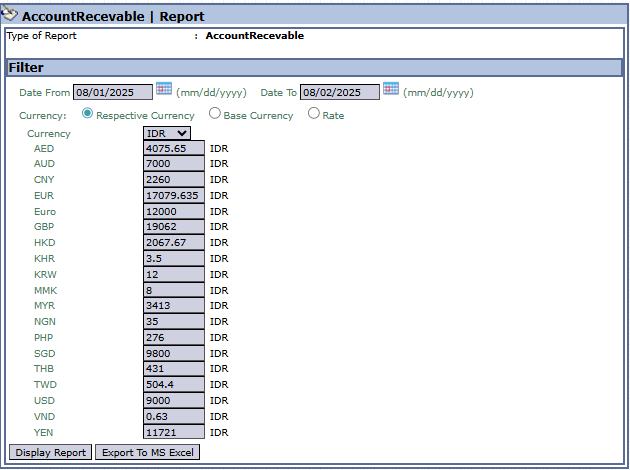
Here is an explanation for each parameter:
-
Date From / Date To:
-
Specify the Date From and Date To range to define the report's period. This filter is very useful for viewing all receivable activities on a single day or another short period (e.g., 08/01/2025 to 08/02/2025).
-
-
Currency:
-
Choose how currency values will be displayed in the report.
-
Respective Currency: Displays values in the original currency of each transaction.
-
Base Currency: Converts all values to the company's base currency (e.g., IDR).
-
Rate: A rate-related option.
-
2. Steps to Generate the Report
Step 1: Set Report Parameters
Define the date range in the Date From and Date To fields, then select the Currency option you want. 
Step 2: Generate the Report
After the parameters are set, click one of the two buttons in the bottom-left section of the page:
-
Display Report: To preview the detail report directly on your screen.

-
Export To MS Excel: To download the report data in an Excel file format.

Tips & Important Notes
-
Use this report when you need to see all receivable transaction details that occurred on a specific date, without needing to filter by customer.
-
This report is very suitable for internal audit purposes or for tracing discrepancies during daily reconciliation.
-
Because there is no customer filter, this report will display data from all customers. It is advisable to use a short date range to get more focused and faster results.
No comments to display
No comments to display