The Gross Margin Analysis module is used to generate a report that analyzes Gross Margin, which is the difference between Sales Revenue and the Cost of Goods Sold (COGS). This report is a very powerful profitability analysis tool, allowing you to dissect the margin by various dimensions such as customer, product, and payment status.
1. Report Parameters (Filter)
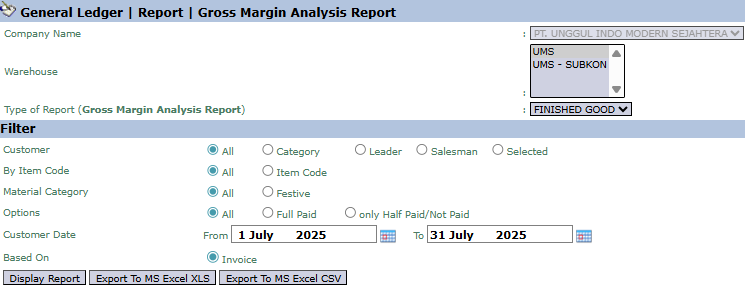
The main page of this module is a form containing various filters to customize the analysis report that will be generated.
Here is an explanation for each parameter:
Warehouse / Type of Report:
Select the Warehouse and Type of Report (e.g., FINISHED GOOD) to define the initial scope of products to be analyzed.
Customer:
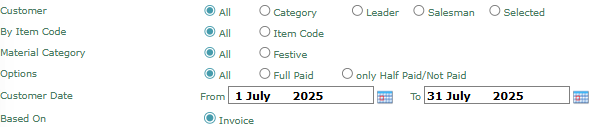
Filter data by customer in various ways: All, Category (Customer Category), Leader, Salesman, or Selected (Specific Customer).
By Item Code / Material Category:
Filter data by product, either for All products or a specific Item Code. You can also filter by Material Category.
Options:
Filter transactions by their payment status: All, Full Paid, or only Half Paid/Not Paid.
Customer Date:
Specify the From and To date range to define the analysis period (e.g., July 1, 2025, to July 31, 2025).
Based On:
Defines the basis for the calculation, which is based on Invoice data.
2. Steps to Generate the Report
Step 1: Set Report Parameters
Select all the combinations of parameters you need in the Filter section to get the specific analysis you want.
Step 2: Generate the Report
After all parameters are set, click one of the three buttons in the bottom-left section of the page:
Display Report: To preview the analysis report directly on your screen.
Export To MS Excel XLS: To download the report data in an Excel file format (.xls).
Export To MS Excel CSV: To download the data in a CSV format.
Tips & Important Notes
This report is crucial for making strategic decisions related to selling prices, product focus, and sales strategy.
Use the Customer filter with the Salesman option to evaluate the profitability generated by each salesperson.
Use the By Item Code or Material Category filter to identify which products yield the highest and lowest profit margins.
To get a valid margin analysis, ensure that the Cost of Goods Sold (COGS) data is accurate in the system.




No comments to display
No comments to display