The Purchase Stock Analysis (Actual Stock Report) module is used to generate a report that analyzes the actual inventory condition from a purchasing perspective. This report is crucial for helping the purchasing team make the right decisions, by classifying items based on their movement speed (fast/slow moving) and their availability status (overstock/understock).
1. Report Parameters (Filter)
The main page of this module is a form containing various parameters to customize the report that will be generated.
Here is an explanation for each parameter:
Item:
Filter the report for All items, by Category, or a specific Item.
Material Status:
Filter items by their movement speed, for example, Fast moving or Slow moving.
Overstock Status:
Filter items by their stock status, for example, Normal, Overstock, or Understock.
2. Steps to Generate the Report
Step 1: Set Report Parameters
Select all the parameters you need, especially combining the Material Status and Overstock Status filters to get the most relevant list of items.
Step 2: Generate the Report
After all parameters are set, click one of the two buttons at the bottom:
View Report: To preview the stock analysis report directly on your screen.
Export To Excel: To download the report data in an Excel file format.
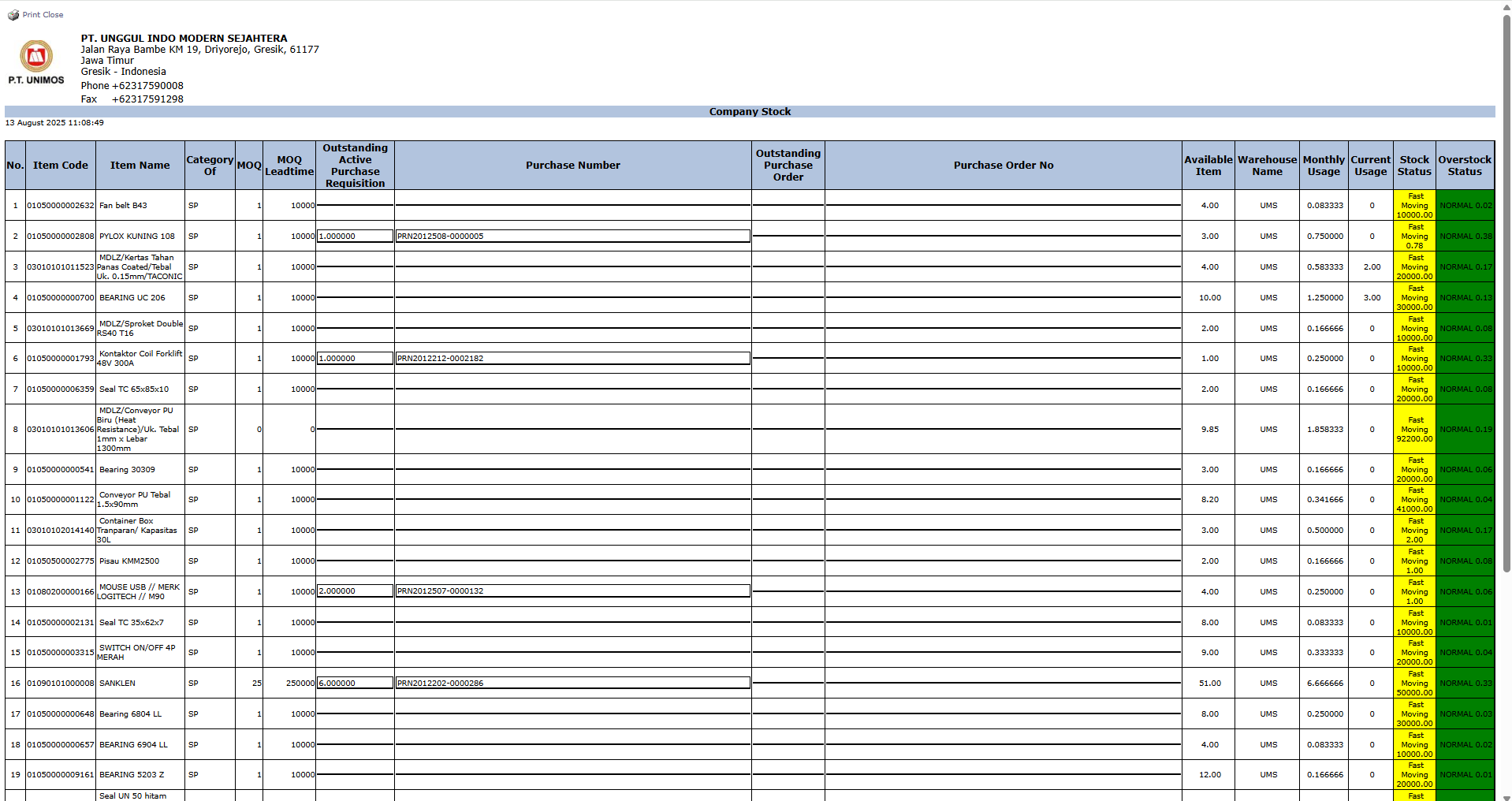
3. Reading the Stock Analysis Report
The generated report will display a list of items along with their stock status and supporting purchase data. Its key columns will include:
Outstanding Purchase Requisition: The quantity that is still in the purchase request process.
Outstanding Purchase Order: The quantity that has been ordered from a vendor but not yet received.
Available Warehouse Item: The physical stock quantity available in the warehouse.
Monthly Usage: The average monthly usage or sales.
Current Stock Status: The current status of the item (e.g., Fast Moving, NORMAL).
Tips & Important Notes
Use this report to make smarter purchasing decisions. For example, prioritize the purchase of items with the status "Fast Moving" and "Understock".
Avoid reordering items with the status "Slow Moving" and "Overstock" to prevent inventory pile-up in the warehouse.
This report is a fundamental tool for the Procurement and PPIC (Production Planning and Inventory Control) teams for efficient inventory management.





No comments to display
No comments to display