The Cubication Calculation module is a logistics planning tool. Its purpose is to calculate the total volume (cubication) and weight of a set of products to be shipped, and then compare that against the capacity of various types of transport vehicles. This helps the logistics team to select the most efficient transport fleet for each shipment.
1. Report Parameters
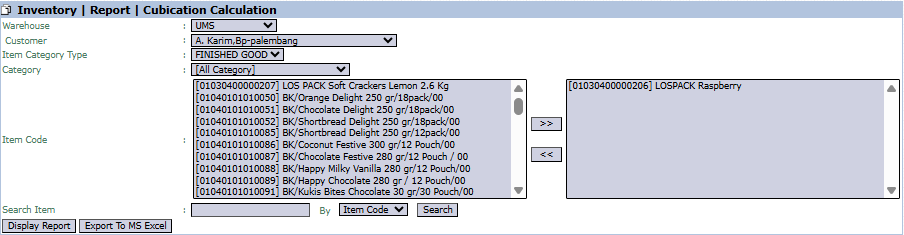
The main page of this module is a form for selecting the items whose cubication will be calculated.
Here is an explanation for each parameter:
Warehouse / Customer:
Select the origin Warehouse for the shipment and the destination Customer.
Item Code:
Use this dual-list box to select all the products that will be included in a single shipment. Move the items from the left box to the right box using the >> button.
2. Steps to Generate the Report
Step 1: Set Report Parameters
Select the Warehouse, Customer, and move all the Item Codes to be shipped into the right-hand box.
Step 2: Generate the Report
After all parameters are set, click one of the two buttons in the bottom-left section of the page:
Display Report: To preview the calculation report directly on your screen.
Export To MS Excel: To download the report data in an Excel file format.
3. Reading the Cubication Calculation Report
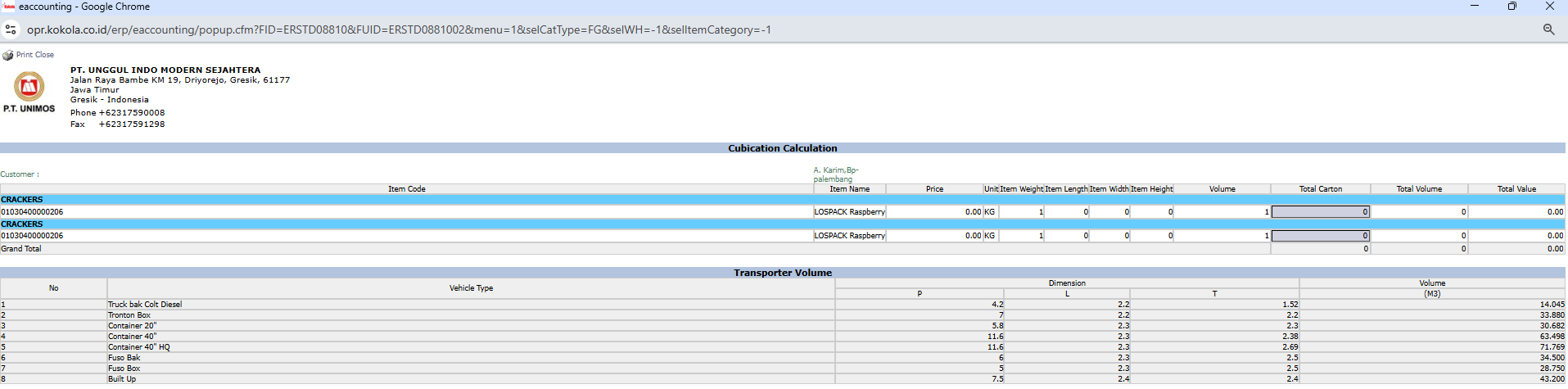
The generated report is divided into two main parts.
Part 1: Cubication Calculation
This section details the total volume of the items you selected. Its columns include Item Code, Item Name, Volume, and Total Carton. Pay attention to the final number in the Total Volume column.
Part 2: Transporter Volume
This section serves as a reference table that displays the volume capacity of various Vehicle Types, such as a Tronton Box Truck and a 20' Container.
How to Use the Report
Compare the Total Volume figure from the first part with the Volume (M3) column in the second part to choose the most efficient and suitable vehicle for your shipment.
Tips & Important Notes
This module is a very important planning tool for the Logistics and Sales Admin teams to optimize shipping costs.
To get a valid calculation, ensure that the dimension data (length, width, height) and weight in the product master data is accurate.




No comments to display
No comments to display