The Quotation Inbox module serves as the approval center for all Quotation documents that have been created and submitted by the sales team. This module is used by a superior or manager to conduct a final review and provide approval before an official price offer can be sent to the customer.
1. Main View (Quotation List)
The main page of this module is an "inbox" that displays all quotations requiring your action.
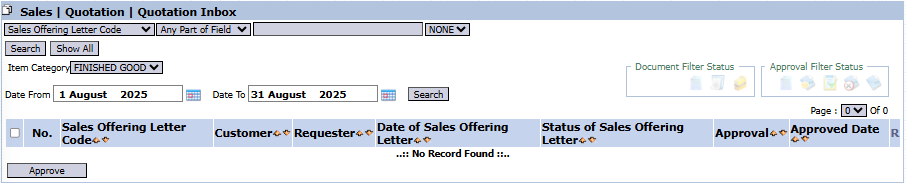
View Explanation & Filters
This page provides a summary of all quotations that are awaiting approval.
Filters: You can search for a specific quotation by Sales Offering Letter Code, Item Category, or a Date From and Date To range.
Request List: The table below will display all quotations awaiting action. The table currently shows "...No Record Found...".
Column Explanation
Sales Offering Letter Code: The unique number of the submitted Quotation document.
Customer: The name of the customer who will receive the quotation.
Requester: The name of the user or employee who submitted the quotation.
Status of Sales Offering Letter / Approval: Icons that indicate the document's status and the approval process status.
Button Functions
Approve: The main action button to approve one or more selected quotations.
2. Approval Process Steps
The following is the standard workflow for an approver.
Step 1: Access the Inbox
Open the Quotation Inbox module to see the list of quotations that require approval.
Step 2: Review Quotation Details
Click on one of the rows in the table to open its detail view. In the detail view, you can check all the information that has been input, such as the product details, prices, discounts, and other terms.
Step 3: Provide Approval
After you have reviewed and are certain about the submitted quotation:
Return to the main Inbox page.
Check the box in the leftmost column for one or more quotation rows you wish to approve.
Click the Approve button located in the bottom-left section of the page to process the approval.
3. Workflow & Integrated Business Process
Submission: A salesperson creates a document in the Quotation module and clicks Confirm.
Entering the Queue: The confirmed quotation automatically enters the queue in this Quotation Inbox module.
Review & Approval: A manager or approver opens this module, reviews, and provides approval.
Finalization: After approval, the Quotation becomes an official document, its status is updated, and it is ready to be printed and sent to the customer, as well as serving as the basis for the creation of a Sales Order.


No comments to display
No comments to display