
Uninvoiched Purchase Order
Report Module Guide: Uninvoiced PO Report
Module Location
Purchasing > Reports > Uninvoiced Purchase Order
Module Objective
The Uninvoiced PO Report module is used to generate a list of all Purchase Orders (POs) for which the goods have likely been received but the invoice has not yet been received or recorded in the system. This report is a crucial control tool for managing accrued liabilities and ensuring all obligations to vendors are recorded.
1. Report Parameters (Filter)
The main page of this module is a form containing various parameters to customize the report that will be generated.
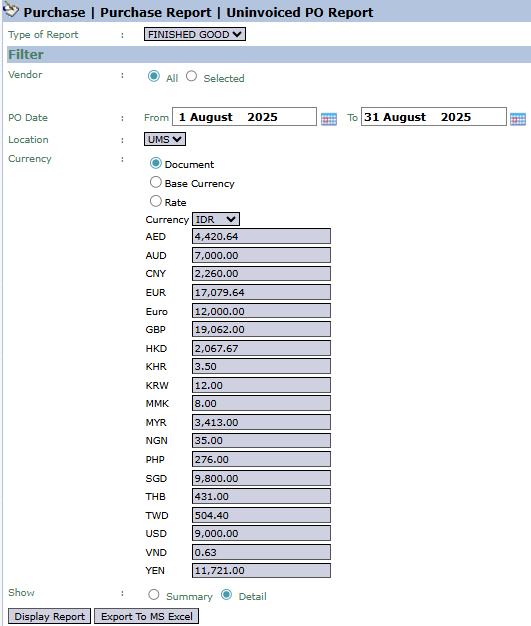
Here is an explanation for each parameter:
-
Vendor:
-
Filter the report by All vendors or a Selected vendor.
-
-
PO Date:
-
Specify the From and To PO creation date range to be displayed (e.g., August 1, 2025, to August 31, 2025).
-
-
Location:
-
Filter the report by location or warehouse.
-
-
Show:
-
Select the report's level of detail: Summary or Detail.
-
2. Steps to Generate the Report
Step 1: Set Report Parameters
Select all the parameters you need, especially defining the PO Date range.

Step 2: Generate the Report
After all parameters are set, click one of the two buttons in the bottom-left section of the page:
-
Display Report: To preview the uninvoiced PO report directly on your screen.

-
Export To MS Excel: To download the report data in an Excel file format.

3. Example of the Report View
After you click, the system will generate a detailed report like the following, which details every PO that still has a remaining balance to be billed.
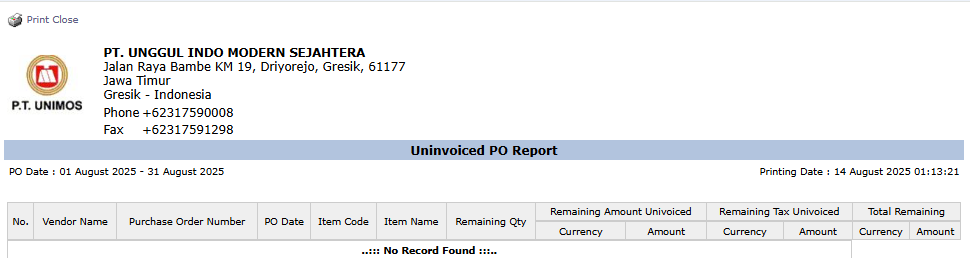
Report Explanation: This report will display a detailed list of each Purchase Order that still has a quantity or value yet to be billed by the vendor.
Key Columns:
-
Purchase Order Number: The reference PO number.
-
Item Name: Details of the product yet to be billed.
-
Remaining Qty: The remaining quantity that has not been invoiced.
-
Remaining Amount Uninvoiced: The remaining value that has not been invoiced.
-
Total Remaining: The total remaining bill per Purchase Order.
Tips & Important Notes
-
Use this report at month-end to identify purchases that need to be recorded as an accrued expense.
-
This report serves as a "worklist" for the Accounting (AP) team to follow-up with vendors who have not yet sent their invoices.
-
The Remaining Amount Uninvoiced column is a key indicator of potential liabilities that have been incurred but have not yet been officially recorded in the accounts payable ledger.
No comments to display
No comments to display