The Chart of Accounts (COA) module is the foundation or "backbone" of the entire accounting system. Its purpose is to create, manage, and view the complete list of all accounts (Assets, Liabilities, Equity, Revenue, Expenses) that the company uses to record financial transactions. The structure defined here will determine how all transactions are classified and reported.
1. Main View (Chart of Accounts List)
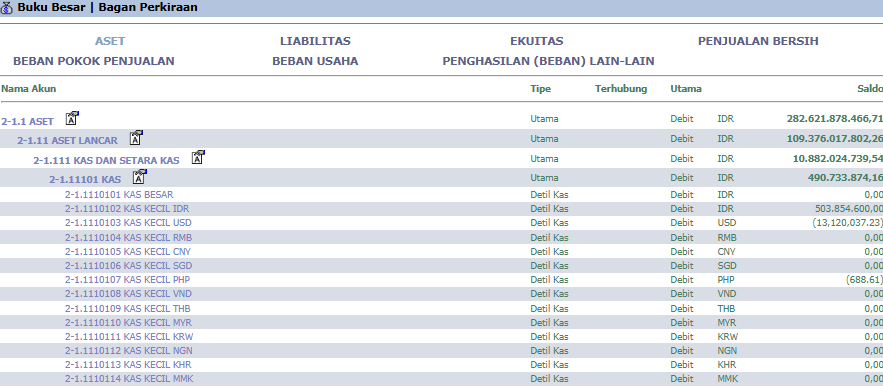
The main page of this module displays the entire Chart of Accounts structure in an organized and hierarchical format.
View Explanation
Hierarchical Structure: This page displays the entire COA structure, organized into standard accounting groups such as ASSETS, LIABILITIES, EQUITY, NET SALES, and others. The accounts are broken down from large groups into more detailed sub-accounts (e.g., 2-1.1 CURRENT ASSETS has a sub-account 2-1.1.1 CASH AND CASH EQUIVALENTS).
Navigation: To view or modify the details of an account, click on the corresponding Account Name.
2. Steps to Manage an Account (Edit Account Form)
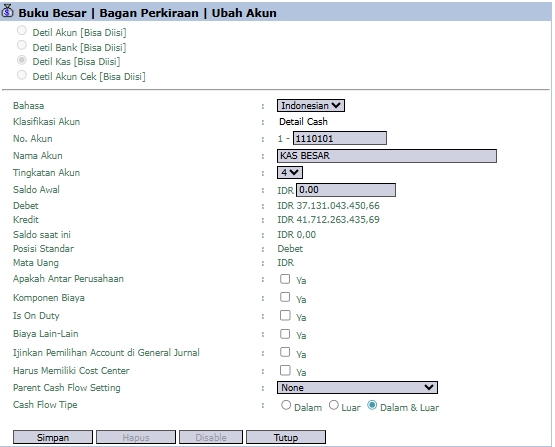
When you create a new account or edit an existing one by clicking on it, you will see a detail form.
Step 1: Fill in Basic Account Information
At the top of the form, fill in or change the basic details of the account:
Account Classification: The main group of the account.
Account No.: The unique code for the account (e.g., 1-1110101).
Account Name: The descriptive name for the account (e.g., PETTY CASH).
Step 2: Set Up Account Behavior (Important!)
This section contains control settings that will affect how this account can be used in transactions:
Allow Account Selection in General Journal: Check "Yes" if this account should be selectable when manually creating a transaction in the General Journal.
Must Have a Cost Center: Check "Yes" if every transaction using this account must be allocated to a Cost Center. This is an important rule for cost tracking.
Cash Flow Type: Set the cash flow classification for this account (In, Out, or In & Out) for the Statement of Cash Flows.
Step 3: Save Changes
Use the buttons in the bottom-left section to save your changes:
Save: Saves the changes you have made.
Delete: Deletes the account (usually only possible if no transactions have used it).
Disable: Deactivates the account so it can no longer be used in new transactions.
Tips & Important Notes
The Chart of Accounts is the most fundamental master data. Changes to this structure have a wide-ranging impact on the entire system and must be made very carefully by the Accounting team.
Settings like Must Have a Cost Center are crucial internal control tools to ensure all costs can be correctly allocated and reported per department.
A well-organized COA structure will result in accurate and easy-to-read Financial Statements (Balance Sheet, Profit & Loss).









No comments to display
No comments to display