The Aged Receivables report module is used to generate an accounts receivable aging report. This report categorizes unpaid customer invoices into "aging buckets" based on how long each invoice is past its due date. It is a crucial tool for cash management, credit risk analysis, and prioritizing collection efforts.
1. Report Parameters (Filter)
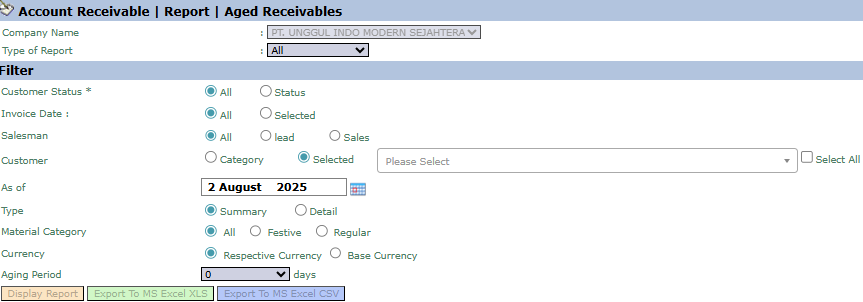
The main page of this module is a form containing various parameters to customize the aged receivables report that will be generated.
Here is an explanation for each key parameter:
Customer:
Filter data by customer in various ways, such as by Category, Salesman, or by selecting a specific customer (Selected).
As of:
Specify the "cut-off" date for the report. The system will calculate the age of the receivables as of this date (e.g., August 2, 2025).
Type:
Select the report's level of detail:
Summary: Displays a summary of total receivables per customer, grouped by their aging category.
Detail: Displays the details of each unpaid invoice for every customer.
Aging Period:
Use this field to define the interval for the aging buckets in days. For example, enter "30" to group receivables into intervals of 0-30 days, 31-60 days, 61-90 days, and so on.
2. Steps to Generate the Report
Step 1: Set Report Parameters
Select all the parameters you need, especially making sure to define the As of date and fill in the Aging Period field to set the report's intervals.
Step 2: Generate the Report
After all parameters are set, click one of the three buttons in the bottom-left section of the page:
Display Report: To preview the report directly on your screen.
Export To MS Excel XLS: To download the report data in an Excel file format (.xls).
Export To MS Excel CSV: To download the data in a CSV format.
Tips & Important Notes
The Aged Receivables report is a primary tool for the Collections team and Finance Management to monitor the health of accounts receivable.
Focus collection efforts on the receivables in the oldest aging columns (e.g., >90 days) as they have the highest risk of being uncollectible.
Run this report routinely (e.g., weekly or monthly) to detect collection problems early and maintain the company's cash flow.






No comments to display
No comments to display