The CBR Analysis Report module is used to generate a detailed report of all Cash Book Requests (CBRs). This report is the primary tool for tracking, summarizing, and analyzing all internal fund requests (e.g., for petty cash, reimbursement claims, etc.) based on various criteria.
1. Report Parameters (Filter)
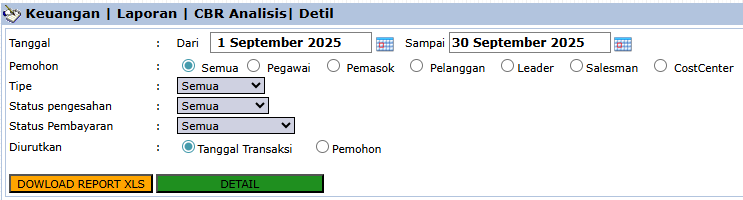
The main page of this module is a form containing various parameters to customize the report that will be generated.
Here is an explanation for each parameter:
Date:
Specify the From and To date range to define the period of requests to be displayed.
Requestor:
A very flexible filter to select the type of requestor, such as All, Employee, Supplier, or per CostCenter.
Approval Status / Payment Status:
Use these dropdowns to filter requests based on their approval or payment status.
Sort by:
Choose how the data will be sorted in the report, whether by Transaction Date or Requestor.
2. Steps to Generate the Report
Step 1: Set Report Parameters
Select all the parameters you need from the comprehensive list to focus the report on the data you wish to analyze.
Step 2: Generate the Report
After all parameters are set, click one of the two buttons at the bottom:
[DETAIL]: To preview the CBR analysis report directly on your screen.
[DOWNLOAD REPORT XLS]: To download the report data in an Excel file format.
Tips & Important Notes
Use this report to analyze operational cash expenditures per department by filtering by CostCenter.
This report is a recapitulation of all data created in the Cash Book Request module.
This is an important audit tool for Finance Management and Internal Audit to monitor cash expenditures that do not originate from purchase invoices.

No comments to display
No comments to display