The Trial Balance module is used to generate the Trial Balance report. This report is a list of all accounts in the general ledger along with their debit or credit balances for a specific period of time. The primary purpose of the Trial Balance is to verify the mathematical equality between the total debits and total credits of all accounts, which is a fundamental step in the accounting cycle before preparing the main Financial Statements.
1. Report Parameters (Trial Balance Filter)
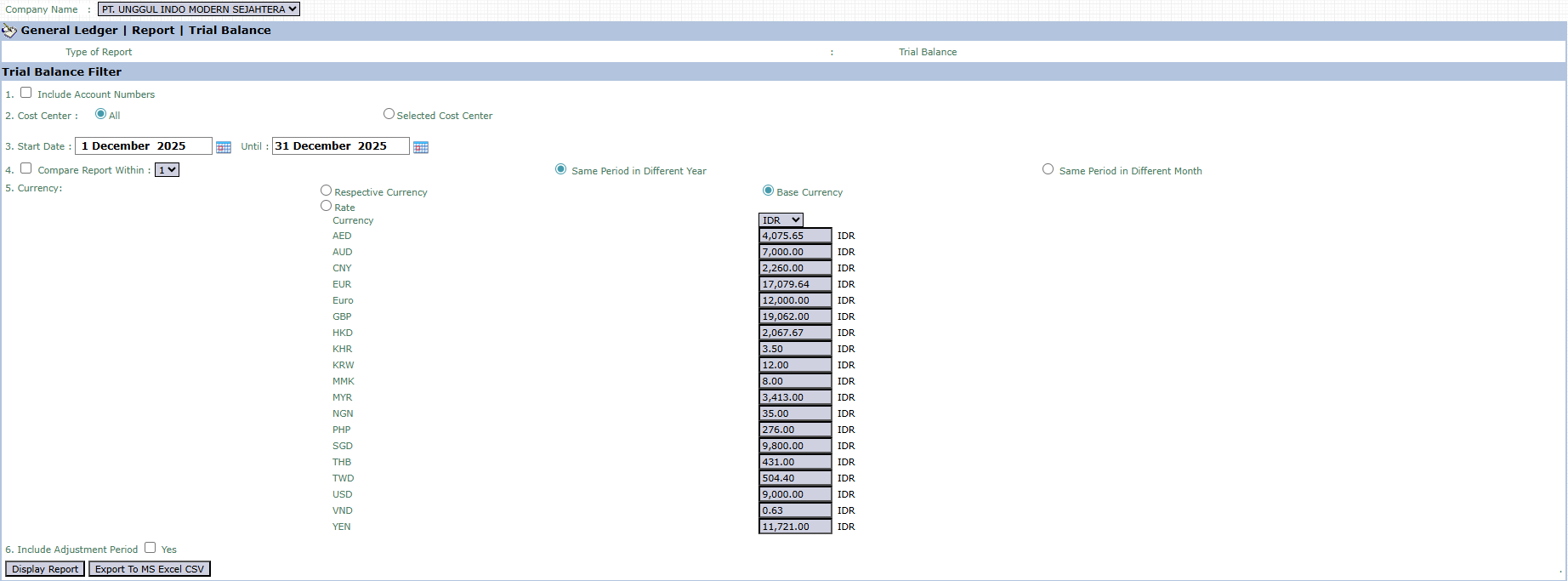
The main page of this module is a form containing various parameters to customize the Trial Balance report according to your needs.
Here is an explanation for each parameter:
Include Account Numbers:
Check this box to display account codes next to account names on the report.
Cost Center:
Select All to display a combined trial balance of all departments, or select Selected Cost Center to generate a report for specific departments only.
Start Date / Until:
Specify the Start Date and Until (End Date) range to define the report's period (e.g., December 1, 2025, to December 31, 2025).
Compare Report Within:
A feature to create a comparative report with the same period in a different year or a different month.
Currency:
Choose how currency values will be displayed, either in Respective Currency (original transaction currency) or Base Currency (company's base currency).
Include Adjustment Period:
Check Yes if you want to include adjusting entries in the calculation of each account's final balance.
2. Steps to Generate the Report
Step 1: Set Report Parameters
Fill in or select all the parameters you need in the Trial Balance Filter section to ensure the generated report matches the desired scope.
Step 2: Generate the Report
After all parameters are set, click one of the three buttons in the bottom-left section of the page:
Display Report: To preview the report directly on your screen.
Export To MS Excel: To download the report data in an Excel file format.
Export To CSV: To download the data in a CSV (Comma-Separated Values) format.
Tips & Important Notes
The Trial Balance is a very important internal working step for the Accounting team before preparing the Profit & Loss Statement and Balance Sheet.
The main purpose of this report is to ensure the total Debit balance exactly equals the total Credit balance. If it is not balanced, this indicates an error in journaling that needs to be traced immediately.
Use the Cost Center filter to check balances at the departmental level, which can help to localize an imbalance if one occurs.




No comments to display
No comments to display