Purchasing > Reports > Price List Comparison Report
Module Objective
The Price List Comparison report module is used to generate a report that compares the purchase price of an item from various sources, such as from different suppliers (vendors) or from different price lists. This report is an important analysis tool for ensuring the company gets the best purchase price.
1. Report Parameters (Filter)
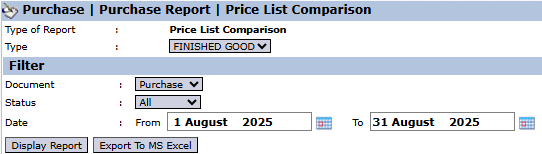
The main page of this module is a form containing several parameters to customize the report that will be generated.
Here is an explanation for each parameter:
Document:
Select the type of document to be compared, for example, Purchase.
Status:
Use this dropdown to filter by document status.
Date:
Specify the From and To date range for the price lists to be compared (e.g., August 1, 2025, to August 31, 2025).
2. Steps to Generate the Report
Step 1: Set Report Parameters
Define the Date range and other filters you need.
Step 2: Generate the Report
After all parameters are set, click one of the two buttons in the bottom-left section of the page:
Display Report: To preview the comparison report directly on your screen.
Export To MS Excel: To download the report data in an Excel file format.
3. Example of the Report View
After you click, the system will generate a report like the following, which compares the prices for the same item.
Report Explanation: The report will display a price comparison for each item from various sources.
Content: Although the example is empty, this report will contain a column for the Item Name, and several subsequent price columns. Each price column will represent an offer from a different vendor or from a different price list, allowing you to compare them side-by-side.
Tips & Important Notes
Use this report before creating a Purchase Order to ensure you are selecting the vendor with the best price offer.
This report is a very useful tool for the Procurement team in conducting price negotiations and vendor performance evaluations.
This report's data is pulled from the Vendor Quotation and Price List modules that you have previously input.



No comments to display
No comments to display