The Memorandum of Understanding (MOU) module is used to create, manage, and track formal cooperation agreement documents with customers, especially for distributors or key clients. This MOU document serves as the master contract that defines all agreed-upon business and commercial terms, such as credit limits, sales targets, and payment terms.
1. Main View (MOU List)
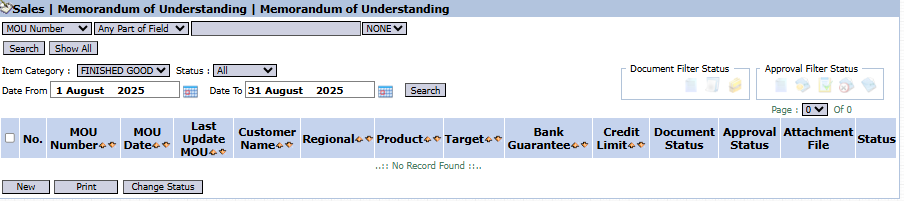
The main page of this module displays a list of all MOU documents that have been created.
View Explanation & Filters
This page is for viewing and managing all MOU agreements.
Filters: You can search for a specific MOU by MOU Number, Item Category, Status, or a date range (Date From / Date To).
MOU List: The table below displays a summary of each MOU, with important columns such as MOU Number, Customer Name, Regional, Target, Bank Guarantee, and Credit Limit.
Button Functions
New: The primary button to create a new MOU document.
Delete: To delete a selected MOU.
Print: To print the details of a selected MOU.
2. Steps to Create a New MOU
Step 1: Create a New MOU
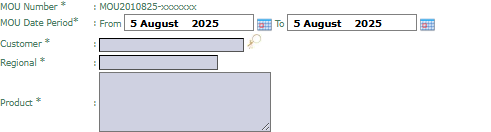
From the Main View, click the New button to open the Add MOU form.
Step 2: Fill in MOU Details
Fill in all the relevant information on the form that appears, which is divided into several sections:
Basic Information:
MOU Number, MOU Due Period, Customer, Regional, and Product .
Trading Term:
Complete all commercial requirements such as Discount, Payment Term, Target, Return Allowance, Credit Limit, and Bank Guarantee.
Distributor Conditions:
If the customer is a distributor, fill in their capacity data such as Number Of Branches, Number Of Warehouse, and Number Of Salesman.
Step 3: Save and Confirm
After all data is filled in, use the buttons in the bottom-left section:
Save: To save the MOU as a draft.
Confirm: To finalize and send the MOU into the approval workflow.
Cancel: To cancel the entry.
Tips & Important Notes
The MOU that is created and approved here will become the basis for all transactions with the related customer.
Ensure all commercial terms such as Credit Limit and Payment Term are filled in accurately, as the system will likely use this data for automatic transaction validation.
An MOU that has been Confirmed will likely go to an MOU Inbox for further approval by management.


 .
.






No comments to display
No comments to display