# Memorandum of Understanding

### **Module Guide: Memorandum of Understanding (MOU)**

#### **Module Location**

#### Sales &gt; Memorandum of Understanding

#### **Module Objective**

#### The **Memorandum of Understanding (MOU)** module is used to create, manage, and track formal cooperation agreement documents with customers, especially for distributors or key clients. This MOU document serves as the master contract that defines all agreed-upon business and commercial terms, such as credit limits, sales targets, and payment terms.

### **1. Main View (MOU List)**

#### The main page of this module displays a list of all MOU documents that have been created.

![image.png](https://manual.kokola.co/uploads/images/gallery/2025-08/scaled-1680-/L5kimage.png)

#### **View Explanation &amp; Filters**

#### This page is for viewing and managing all MOU agreements.

<div _ngcontent-ng-c558004504="" class="conversation-container message-actions-hover-boundary ng-star-inserted" id="bkmrk-filters%3A-you-can-sea" style="text-align: justify;"><div _ngcontent-ng-c2925024889=""><div _ngcontent-ng-c957249891="" class="response-container ng-tns-c957249891-96 response-container-with-gpi is-mobile ng-star-inserted response-container-has-multiple-responses" jslog="173900;track:impression,attention"><div _ngcontent-ng-c957249891="" class="presented-response-container ng-tns-c957249891-96"><div _ngcontent-ng-c957249891="" class="response-container-content ng-tns-c957249891-96 is-mobile has-thoughts"><div _ngcontent-ng-c2925024889="" class="response-content ng-tns-c957249891-96"><div _ngcontent-ng-c285899382="" class="markdown markdown-main-panel stronger enable-updated-hr-color" dir="ltr">- #### **Filters**: You can search for a specific MOU by **MOU Number**, **Item Category**, **Status**, or a date range (**Date From / Date To**).
- #### **MOU List**: The table below displays a summary of each MOU, with important columns such as **MOU Number**, **Customer Name**, **Regional**, **Target**, **Bank Guarantee**, and **Credit Limit**.

</div></div></div></div></div></div></div>#### **Button Functions**

<div _ngcontent-ng-c558004504="" class="conversation-container message-actions-hover-boundary ng-star-inserted" id="bkmrk-new%3A-the-primary-but" style="text-align: justify;"><div _ngcontent-ng-c2925024889=""><div _ngcontent-ng-c957249891="" class="response-container ng-tns-c957249891-96 response-container-with-gpi is-mobile ng-star-inserted response-container-has-multiple-responses" jslog="173900;track:impression,attention"><div _ngcontent-ng-c957249891="" class="presented-response-container ng-tns-c957249891-96"><div _ngcontent-ng-c957249891="" class="response-container-content ng-tns-c957249891-96 is-mobile has-thoughts"><div _ngcontent-ng-c2925024889="" class="response-content ng-tns-c957249891-96"><div _ngcontent-ng-c285899382="" class="markdown markdown-main-panel stronger enable-updated-hr-color" dir="ltr">- #### **New**: The primary button to create a new MOU document.
- #### **Delete**: To delete a selected MOU.
- #### **Print**: To print the details of a selected MOU.

</div></div></div></div></div></div></div>### **2. Steps to Create a New MOU**

#### **Step 1: Create a New MOU**

#### From the Main View, click the **New** button to open the **Add MOU** form. ![image.png](https://manual.kokola.co/uploads/images/gallery/2025-08/scaled-1680-/hD8image.png)

#### **Step 2: Fill in MOU Details**

#### Fill in all the relevant information on the form that appears, which is divided into several sections:

<div _ngcontent-ng-c558004504="" class="conversation-container message-actions-hover-boundary ng-star-inserted" id="bkmrk-basic-information%3A-m" style="text-align: justify;"><div _ngcontent-ng-c2925024889=""><div _ngcontent-ng-c957249891="" class="response-container ng-tns-c957249891-96 response-container-with-gpi is-mobile ng-star-inserted response-container-has-multiple-responses" jslog="173900;track:impression,attention"><div _ngcontent-ng-c957249891="" class="presented-response-container ng-tns-c957249891-96"><div _ngcontent-ng-c957249891="" class="response-container-content ng-tns-c957249891-96 is-mobile has-thoughts"><div _ngcontent-ng-c2925024889="" class="response-content ng-tns-c957249891-96"><div _ngcontent-ng-c285899382="" class="markdown markdown-main-panel stronger enable-updated-hr-color" dir="ltr">- #### **Basic Information**:
    
    
    - #### **MOU Number**, **MOU Due Period**, **Customer**, **Regional**, and **Product  
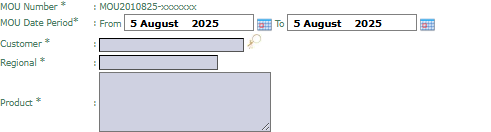
        ![image.png](https://manual.kokola.co/uploads/images/gallery/2025-08/scaled-1680-/cAaimage.png)**.
- #### **Trading Term**:
    
    
    - #### Complete all commercial requirements such as **Discount**, **Payment Term**, **Target**, **Return Allowance**, **Credit Limit**, and **Bank Guarantee**.  

        ![image.png](https://manual.kokola.co/uploads/images/gallery/2025-08/scaled-1680-/vhlimage.png)  
        ![image.png](https://manual.kokola.co/uploads/images/gallery/2025-08/scaled-1680-/mmZimage.png)
- #### **Distributor Conditions**:
    
    
    - #### If the customer is a distributor, fill in their capacity data such as **Number Of Branches**, **Number Of Warehouse**, and **Number Of Salesman**.   



        ![image.png](https://manual.kokola.co/uploads/images/gallery/2025-08/scaled-1680-/l6ximage.png)![image.png](https://manual.kokola.co/uploads/images/gallery/2025-08/scaled-1680-/aDDimage.png)![image.png](https://manual.kokola.co/uploads/images/gallery/2025-08/scaled-1680-/S6bimage.png)

</div></div></div></div></div></div></div>#### **Step 3: Save and Confirm**

#### After all data is filled in, use the buttons in the bottom-left section:

<div _ngcontent-ng-c558004504="" class="conversation-container message-actions-hover-boundary ng-star-inserted" id="bkmrk-save%3A-to-save-the-mo" style="text-align: justify;"><div _ngcontent-ng-c2925024889=""><div _ngcontent-ng-c957249891="" class="response-container ng-tns-c957249891-96 response-container-with-gpi is-mobile ng-star-inserted response-container-has-multiple-responses" jslog="173900;track:impression,attention"><div _ngcontent-ng-c957249891="" class="presented-response-container ng-tns-c957249891-96"><div _ngcontent-ng-c957249891="" class="response-container-content ng-tns-c957249891-96 is-mobile has-thoughts"><div _ngcontent-ng-c2925024889="" class="response-content ng-tns-c957249891-96"><div _ngcontent-ng-c285899382="" class="markdown markdown-main-panel stronger enable-updated-hr-color" dir="ltr">- #### **Save**: To save the MOU as a draft. ![image.png](https://manual.kokola.co/uploads/images/gallery/2025-08/scaled-1680-/QXJimage.png)
- #### **Confirm**: To finalize and send the MOU into the approval workflow. ![image.png](https://manual.kokola.co/uploads/images/gallery/2025-08/scaled-1680-/QnAimage.png)
- #### **Cancel**: To cancel the entry. ![image.png](https://manual.kokola.co/uploads/images/gallery/2025-08/scaled-1680-/AzKimage.png)

</div></div></div></div></div></div></div>### **Tips &amp; Important Notes**

<div _ngcontent-ng-c558004504="" class="conversation-container message-actions-hover-boundary ng-star-inserted" id="bkmrk-the-mou-that-is-crea"><div _ngcontent-ng-c2925024889=""><div _ngcontent-ng-c957249891="" class="response-container ng-tns-c957249891-96 response-container-with-gpi is-mobile ng-star-inserted response-container-has-multiple-responses" jslog="173900;track:impression,attention"><div _ngcontent-ng-c957249891="" class="presented-response-container ng-tns-c957249891-96"><div _ngcontent-ng-c957249891="" class="response-container-content ng-tns-c957249891-96 is-mobile has-thoughts"><div _ngcontent-ng-c2925024889="" class="response-content ng-tns-c957249891-96"><div _ngcontent-ng-c285899382="" class="markdown markdown-main-panel stronger enable-updated-hr-color" dir="ltr" id="bkmrk-the-mou-that-is-crea-1">- #### The MOU that is created and approved here will become the **basis for all transactions** with the related customer.
- #### Ensure all commercial terms such as **Credit Limit** and **Payment Term** are filled in accurately, as the system will likely use this data for automatic transaction validation.
- #### An MOU that has been **Confirmed** will likely go to an **MOU Inbox** for further approval by management.

</div><div _ngcontent-ng-c2925024889="" class="response-footer is-mobile gap has-thoughts complete"></div></div></div></div><div _ngcontent-ng-c957249891="" class="response-container-footer ng-tns-c957249891-96"><div _ngcontent-ng-c2785631642="" class="actions-container-v2 ng-tns-c2785631642-100 mobile"></div></div></div></div></div>
