The Sales Document Flow Report module is used to generate a report that tracks the entire end-to-end document flow of a sales process. This report visually links one document to the next, starting from the Sales Order, to Shipment Notes (Shipping), to the Sales Invoice (Billing), and finally to the Cash Book (Payment Receipt).
1. Report Parameters (Filter)
The main page of this module is a form containing several parameters to customize the report that will be generated.
Here is an explanation for each parameter:
Sales Order:
Use this field to search for and trace the document flow of one specific Sales Order number.
Customer:
Filter the report by All customers or a Selected customer.
Sales Order Document Date:
Specify the creation date range (From and To) of the Sales Orders whose document flow you want to see (e.g., August 1, 2025, to August 8, 2025).
2. Steps to Generate the Report
Step 1: Set Report Parameters
Select all the parameters you need to focus the report on the transaction(s) you wish to trace.
Step 2: Generate the Report
After the parameters are set, click the Display Report button in the bottom-left section of the page to see the document flow report.
3. Reading the Document Flow Report
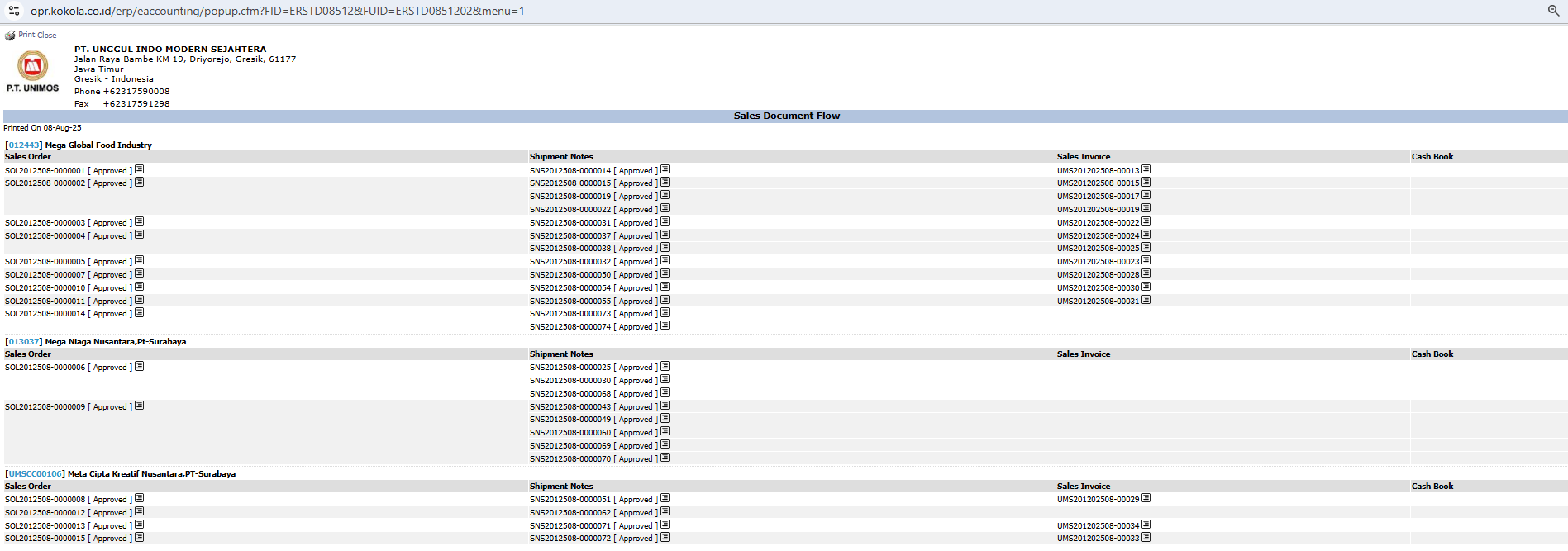
The generated report will display the interlinked document flow for each order.
Report Explanation: This report displays the sales document flow, grouped by Customer.
Document Flow Structure: This report shows the complete flow from left to right:
Sales Order: The initial stage where the customer's order is recorded.
Shipment Notes: The shipping command document created based on the Sales Order.
Sales Invoice: The billing document created based on the shipment.
Cash Book: The final stage, showing the payment receipt document.
Document Status: Pay attention to the status next to each document number (e.g., [approved]) to know its progress at each stage.
Tips & Important Notes
Use this report to get a complete picture of an order's lifecycle, from the moment the order is received until it is fully paid.
This report is very useful for the Customer Service and AR (Account Receivable) teams to accurately answer customer questions about the status of orders, shipments, and payments.
If the Cash Book column is still empty, it indicates that the related invoice has not yet been paid.



No comments to display
No comments to display